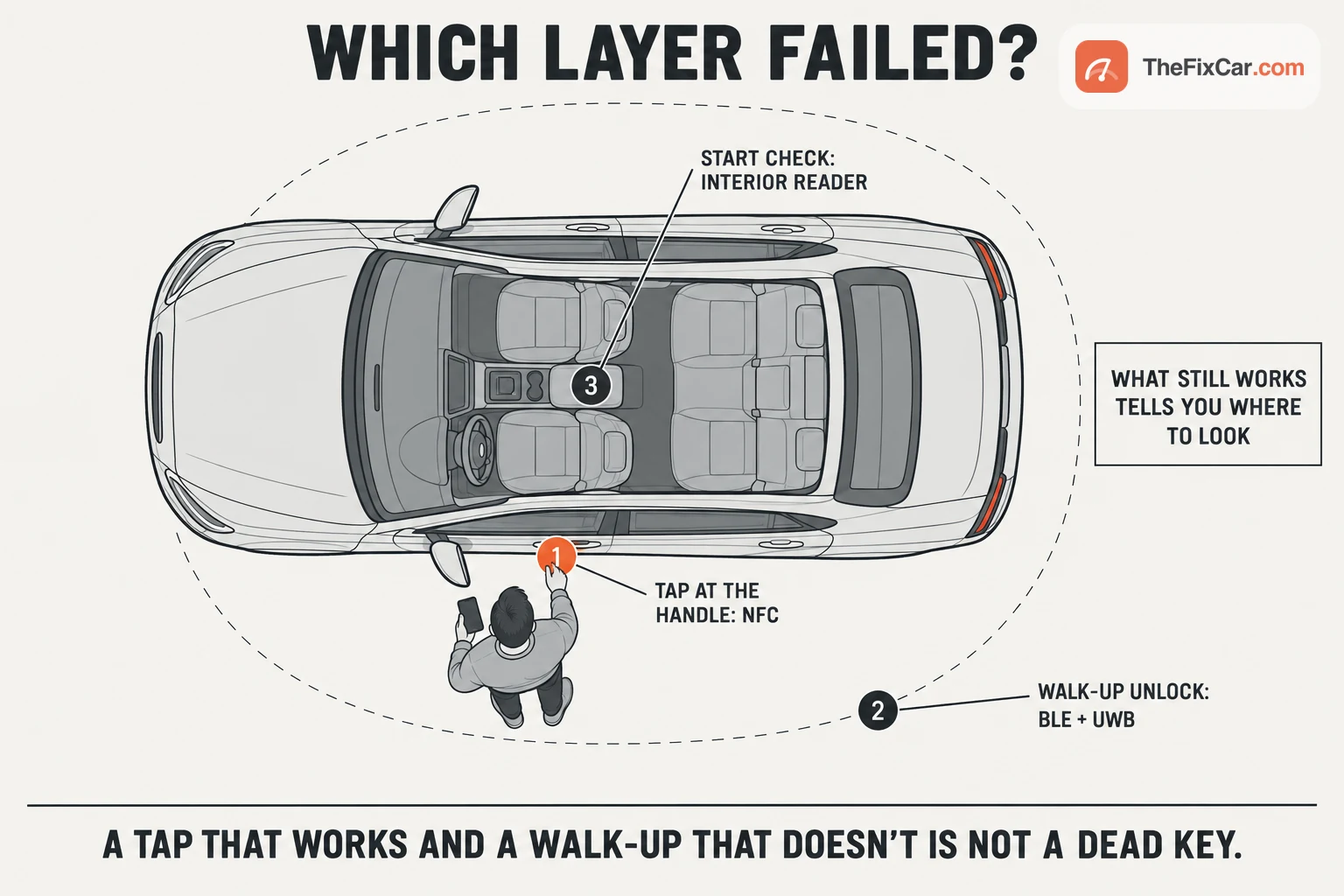
A digital car key can stop working for entry, for starting, or for sharing, and the three fail in different ways. The tap at the door handle keeps working while the walk-up unlock dies, or the doors open and the car will not start, or the phone only works when it is lying on the console pad, or a key you shared never activates on the other phone. What still works does not name the broken part, but it does choose the next check.
This page is arranged by what still works. For each pattern it lists the causes the makers themselves document (Google, Apple, Samsung, Kia, Genesis, Hyundai, BMW, Ford and Tesla), the observation that shifts suspicion between them, and the comparisons to make before you delete or re-register anything. How the three radios divide the job is on the digital car key specs page; this page is about what to do when one of them stops.
Quick answer
Compare with a known-good fob first, using the car’s normal procedure: a fob that also fails moves the search to the car and its low-voltage battery, while a fob that works keeps the phone side in play without clearing the car. A mechanical emergency key tests the door lock, not the digital key.[1][6]
| What you see | First check |
|---|---|
| Tap at the handle works, walk-up unlock does not | Passive-entry support and setting for this exact phone and car; on a Google Wallet setup, then Google’s order: vehicle software, remove and re-pair once a fallback is in hand[2] |
| Doors unlock, car will not start | The car’s documented interior reader and start procedure, with nothing between phone and reader[3][13] |
| Works only when the phone lies on the pad | Whether this phone and car support passive entry at all, then the same checks as row one[2][5] |
| Nothing works, not even the tap | Phone out of its case, NFC enabled where the phone has that setting, then the fob or registered NFC card for comparison[6][1] |
| Shared key never activates | The activation method shown in the recipient’s wallet: a code on the car screen or in the wallet, or a start with the physical key inside[7] |
A guide, not a diagnosis: every row has more than one cause.
Symptoms and what else causes them
The pattern of what still works narrows the search more than any single test, without naming the failed part. A successful unlock does not show that the phone will be detected for starting, and a working tap does not show that the walk-up path is healthy; each is checked against the car’s own documented procedure.
| Symptom | Competing causes | Clues that shift suspicion |
|---|---|---|
| NFC tap unlocks, passive entry does not | Passive entry switched off in the wallet; phone or car without the radios the walk-up uses (CCC Release 3 passive entry uses BLE together with UWB; Ford Phone As A Key uses Bluetooth-based proximity), so walk-up was never supported; vehicle software behind; a stale pairing; a shared key with limited permissions; a region where the phone’s UWB is disabled | If the problem began after a phone or car update, start with the wallet’s and the car maker’s troubleshooting; the timing alone does not prove a broken pairing. If it never worked, check passive-entry support for the exact phone model, model year, market and software; BMW’s April 2023 Android list, for example, names specific Galaxy and Pixel variants only[2][5] |
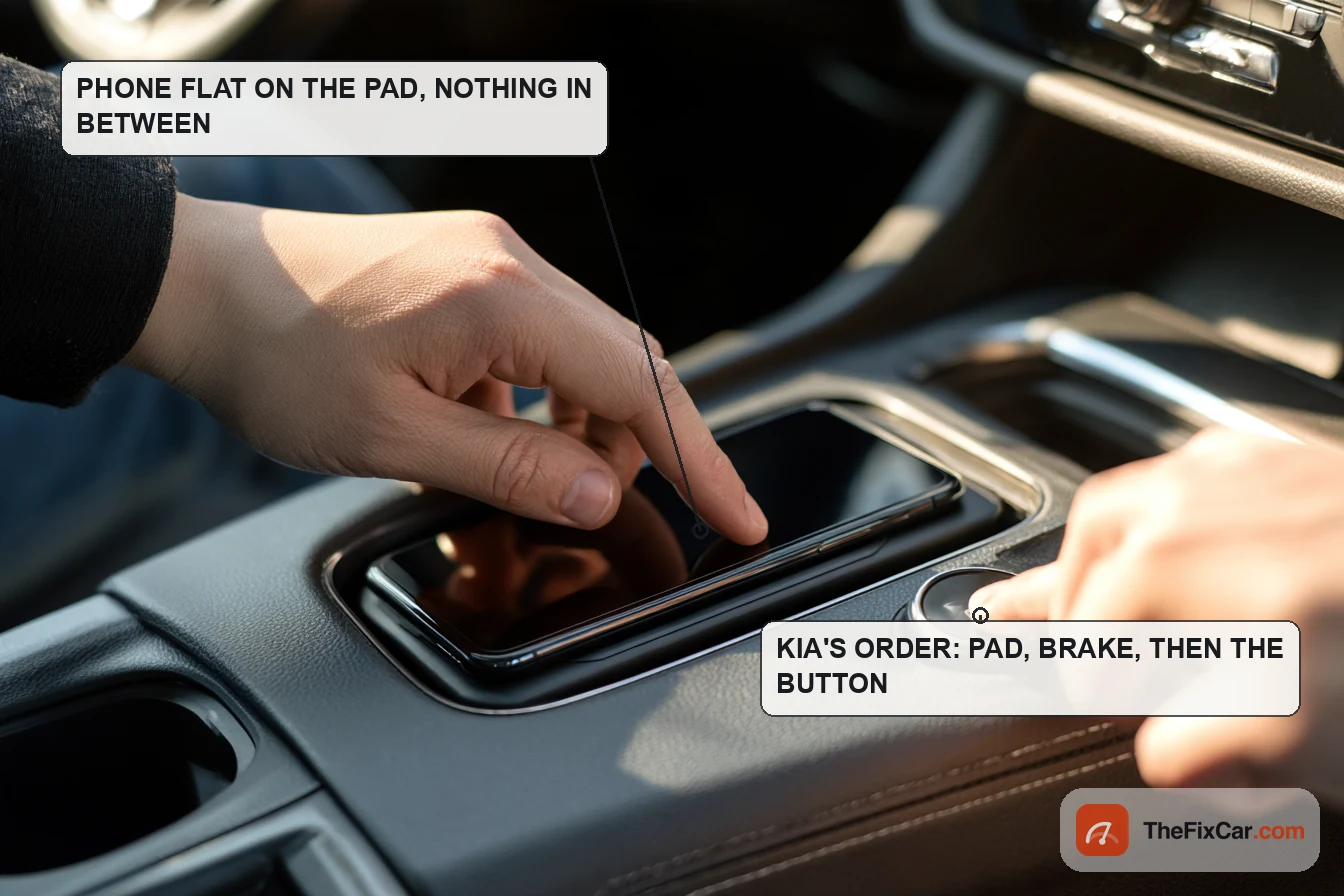
| Door unlocks, will not start | Phone not at the car’s designated start reader or lifted off it; brake not pressed; a case, card or object between phone and reader; shared-key permissions or expiry; phone’s power reserve exhausted after unlocking on the last of it; a separate starting fault | Starting at the documented reader shows that path works; it does not by itself explain why starting failed elsewhere. The cited Kia order is pad, brake, then button[3][6][7] |
| Works only on the charging or authentication pad | BLE/UWB passive-entry path down while NFC works; passive entry off; a phone or car without passive-entry support; Bluetooth off on the phone; the wallet app restricted by the phone’s battery or background settings | The cited Kia manual lists Bluetooth switched off and the app being limited by the phone’s own settings among the conditions that affect operation; reader-based use can also simply be all that this phone and car pairing supports[6] |
| Passive entry stopped after the phone sat near the car for hours | Low vehicle-battery charge, which the cited Kia manual links to a registered UWB phone left in Bluetooth range; a car-side fault in the digital-key module that the fob does not use | Kia warns that a UWB phone left within Bluetooth range for an extended time can consume the 12 V battery and says to turn passive entry off to prevent it. A fob that also fails points at the car’s battery[6][1] |
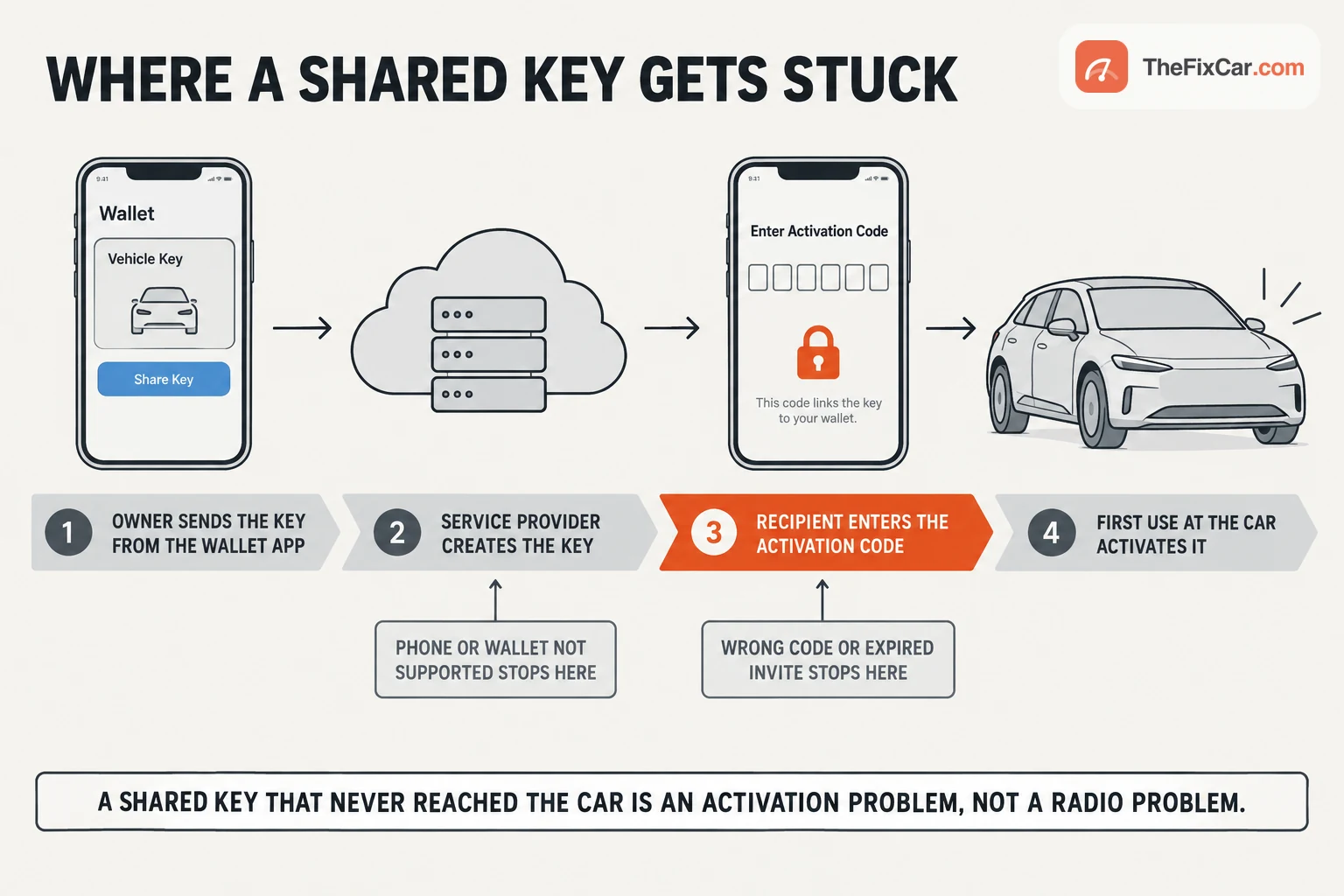
| Shared key will not activate | Incorrect activation code; invite link opened on an unsupported phone or wallet; the recipient’s first use never happened at the car; the key’s own expiry | Google: enter the code on the car screen or in the wallet, or start the car with the shared key while the physical key is inside; Samsung: only the owner can start sharing, and identity verification may need a fingerprint[7][11] |
| Key vanished after a new phone or account change | Signed out of the Apple Account; transfer done without the old phone nearby; Samsung key tied to a single phone by design; key removed through Google’s Find Hub or disabled by Apple’s Lost Mode | Apple: signing out loses the key, and a transfer needs the previous device nearby and online. Samsung: a key “cannot be duplicated or transferred between devices,” so it is re-registered, not moved[4][11][2] |
| Nothing works, not even the tap | Case or cards blocking NFC; NFC off; phone off past its reserve; vehicle low-voltage battery discharged; key deleted | The fob comparison narrows this without isolating it. Fob works: keep the phone side in play (case, NFC, reserve, deleted key) without clearing the car. Fob fails too: the car and its low-voltage battery come first, and the fob itself needs checking[6][1] |
The tap: case, cards and a phone that has gone quiet
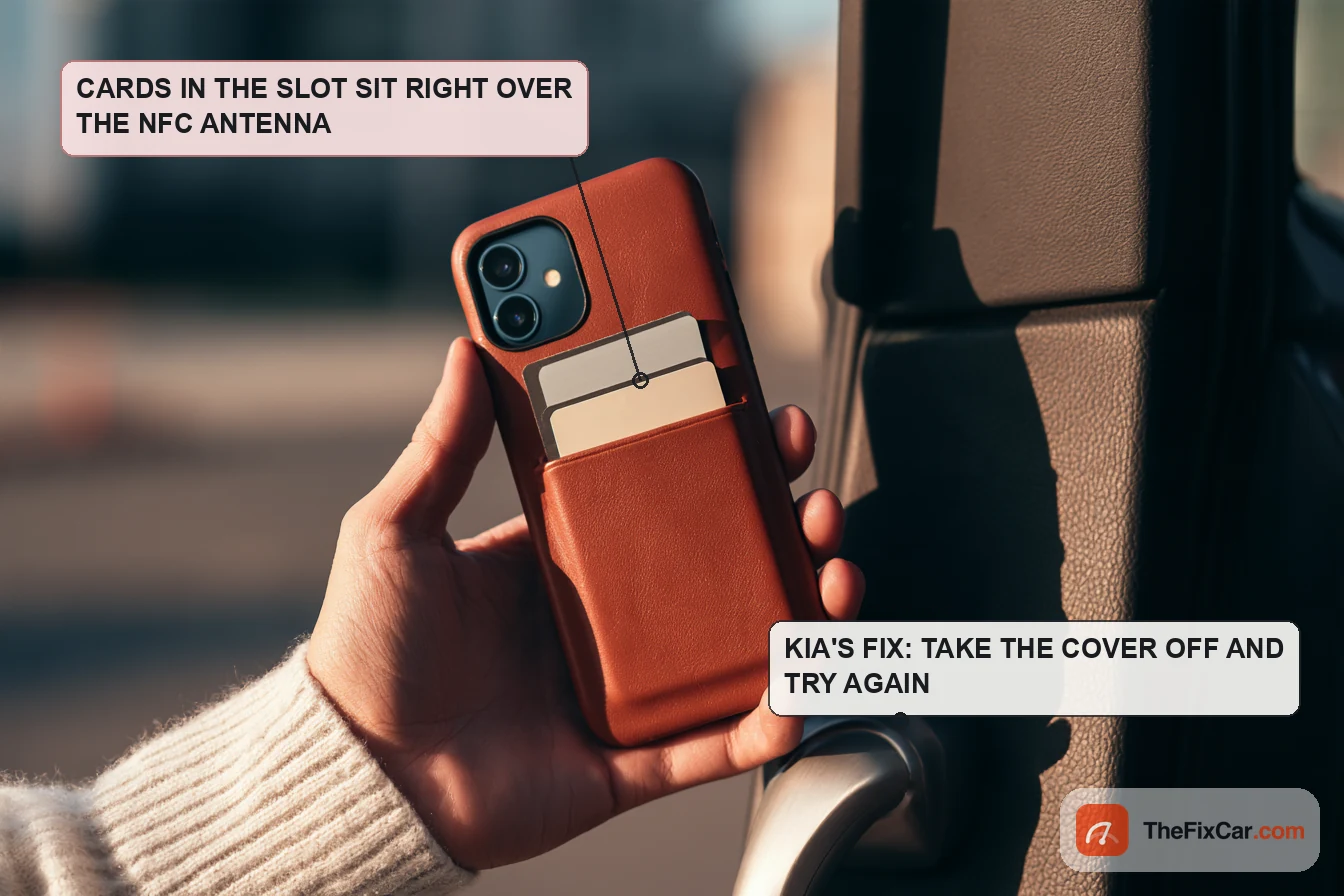
Kia’s Digital Key 2 manual (the 2026 SW1K manual cited here) lists a credit card overlapped on the back of the phone, a metal or thick case and a metallic cover as reasons the key may not work, and its fix is blunt: remove the cover and try again.[6] Google says the same about cards in a phone case sitting between the phone and the reader, and its setup troubleshooting includes checking that NFC is enabled.[10] The reader wants the phone’s NFC antenna against it, for as long as the car specifies: the cited Kia manual says more than two seconds at the door-handle pad, Hyundai’s Digital Key 2 guide one second, and Kia’s retry instruction is to move the phone more than 4 inches away and bring it back. Use your own car’s reader position, hold time and retry procedure.[3][9]
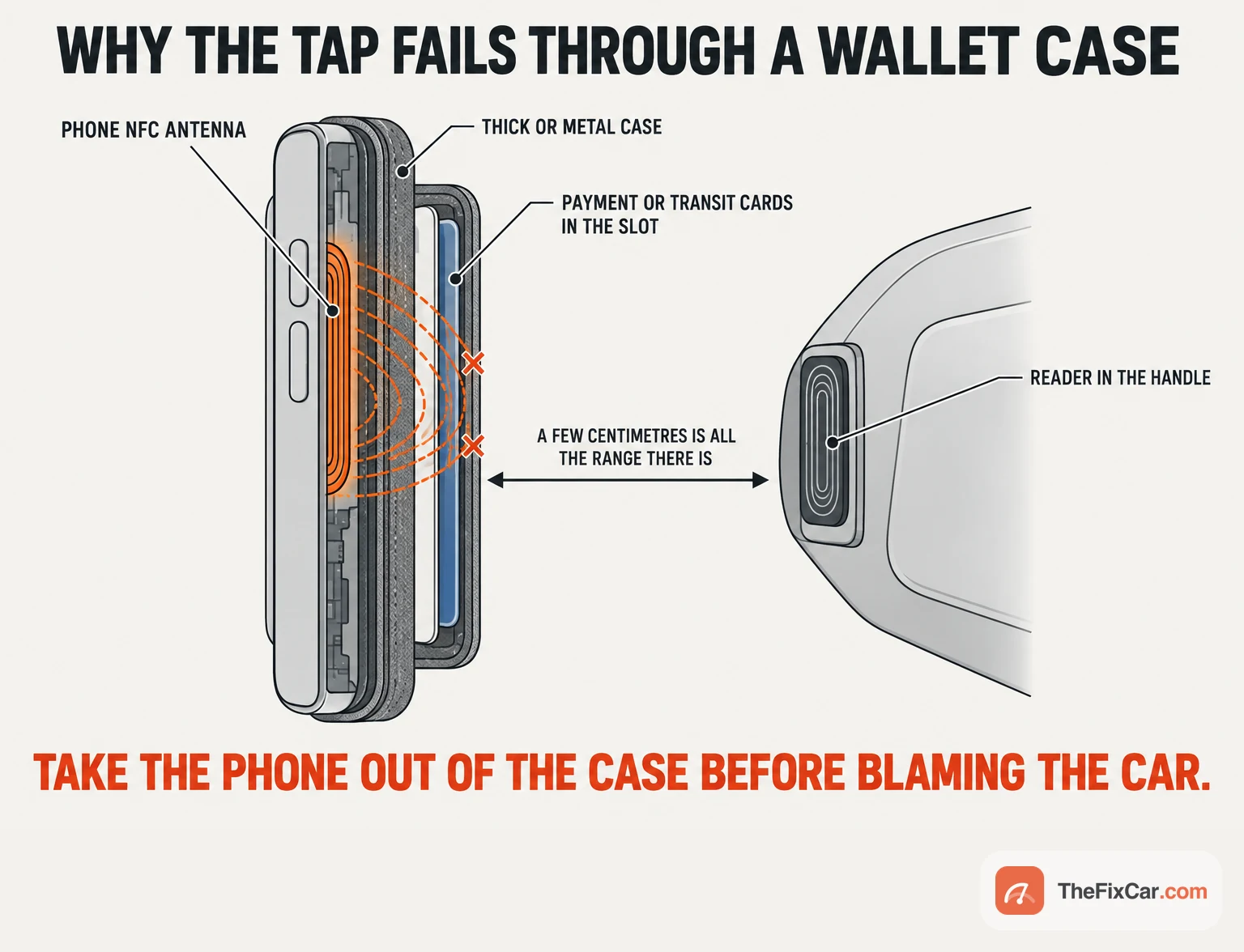
A phone that has shut down is the other tap failure. Some phone and key combinations keep NFC access going after the battery runs out: Apple documents up to five hours for a compatible key with Express Mode on, Samsung quotes five hours after the phone turns off from a flat battery, and BMW gives roughly the same figure for holding a dead phone to the handle, each under its own conditions and none as a guaranteed remaining period.[12][11][13] Samsung notes that if identity verification is switched on, the fingerprint check it needs will not run on a phone that is off.[11] The fallback is whatever the car maker gave you: Hyundai’s NFC key card, Ford’s keypad code and backup start passcode, or the fob.[9][14]
The walk-up: passive entry that quit while the tap still works
When the tap works and the walk-up does not, the walk-up path is where to look, and Google’s troubleshooting is written for that case on a supported Google Wallet setup: “If passive entry or remote commands don’t work on your supported device, you may have to update the vehicle software, remove the key and pair again.”[2] Before removing anything, make sure you have a working fallback and whatever the car’s registration procedure needs, then check that passive entry is still on; Google turns it on by default at setup, Kia’s manual tells owners to turn it off to stop battery drain, and a key left in that state behaves exactly like a broken one.[2][6]
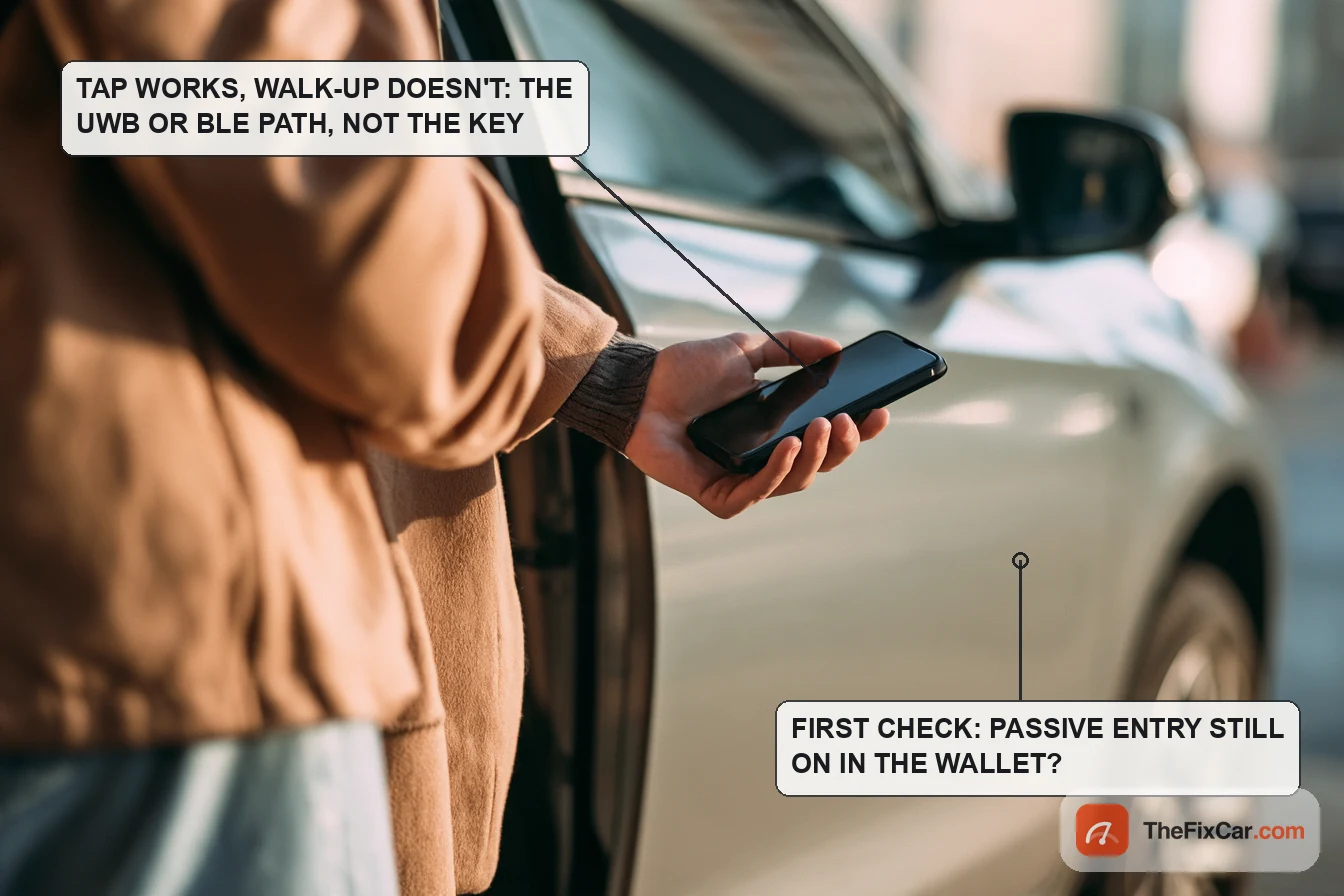
The other question is whether walk-up entry was ever available on this pairing. Google says plainly that not all devices and not all vehicles support passive entry, Apple limits it to iPhone 11 or later excluding the SE models and the 16e, and BMW’s April 2023 Android announcement named specific Galaxy and Pixel variants rather than whole product lines.[2][4][5] Wallet compatibility on its own does not establish compatibility with your car: check whether the car maker supports that exact phone for NFC access, passive entry, both or neither, for your model year, market and software, and re-pairing will not add a capability the pairing never had. Ford’s Phone As A Key uses Bluetooth, and Ford’s own list of what disrupts it reads like a walk-up failure checklist: Bluetooth disabled or out of range, an outdated phone OS, thick cases, metal objects, purses and back pockets, the app not running, and a depleted vehicle battery.[1] The cited Tesla Model Y guide lists the same shape of checks for its phone key: Bluetooth off and on, charge the phone, keep the app running in the background, location permission set to always, and, in that guide’s menu path, remove the phone key under Controls and Locks and set it up again; use the instructions for your own model and software version, and confirm a working backup before removing a phone key.[15] If the phone will not hold any Bluetooth connection to the car, the general checks in Bluetooth not connecting to car come first.
The start: unlocked, seated, and nothing happens
Use the starting procedure your car documents, because it varies: some systems start with the phone in a pocket, others need the phone at a designated reader, and a wireless charging pad is a key reader only where the maker says so. The cited Kia sequence is the registered phone on the in-vehicle authentication pad, which on that car is the wireless charging pad, then the brake, then the button; the cited BMW procedure is the phone in the wireless charging tray and the start button; Google’s general instruction is the phone on the car’s key reader.[3][13][2] On those cars a phone in a pocket, on the passenger seat or half off the pad has not been presented to the reader, and Google’s case-and-card caution applies to the reader as it does to the handle.[10]
Two documented conditions belong on the list before a start fault is assumed, without excluding one. A shared key carries permissions and can carry an expiry, so check both in the wallet and the car’s instructions before treating a recipient’s failed start as a fault.[7] And the 2023 Genesis GV60 and 2026 Kia manuals both list an active phone call, an emergency call, audio playing and wireless earphones as conditions under which the phone may not control the car at all.[8][6]
Phone fault, or the car?
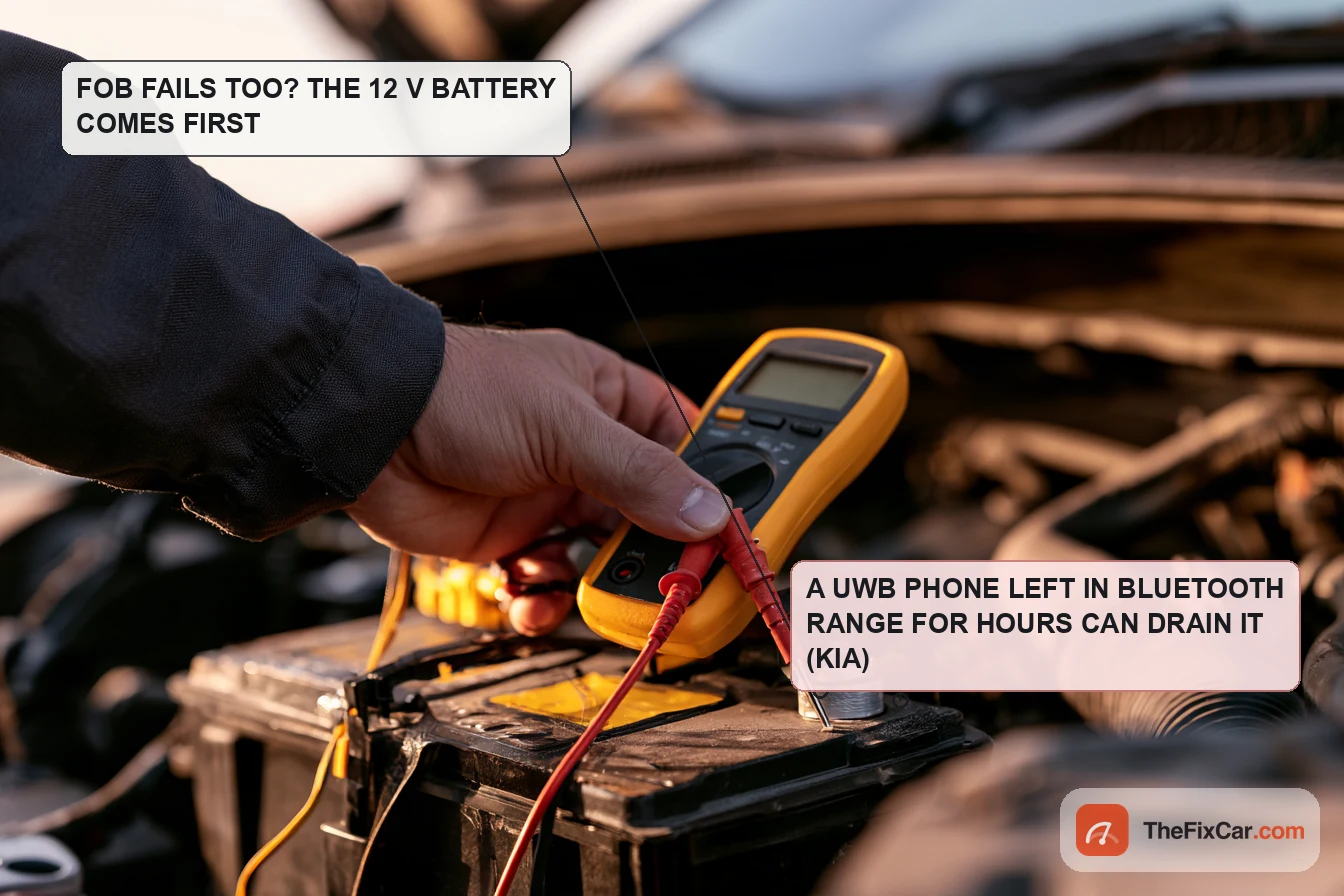
Part of this list is not the phone’s fault. The vehicle’s low-voltage battery comes first: Kia and Genesis list a discharged vehicle battery among the reasons the digital key may not operate, Ford says a depleted vehicle battery prevents communication with Phone As A Key, and no wallet setting fixes it.[6][8][1] The fob comparison is the sorting step: if the fob also fails to open or start the car, work on the car before the phone, beginning with car won’t start but lights turn on. Confirm the battery type, nominal voltage and approved test procedure for your car first; where it is a conventional 12 V battery, testing it with a multimeter is the next step, and a resting voltage alone does not separate a weak battery from a connection, charging or access-system fault.
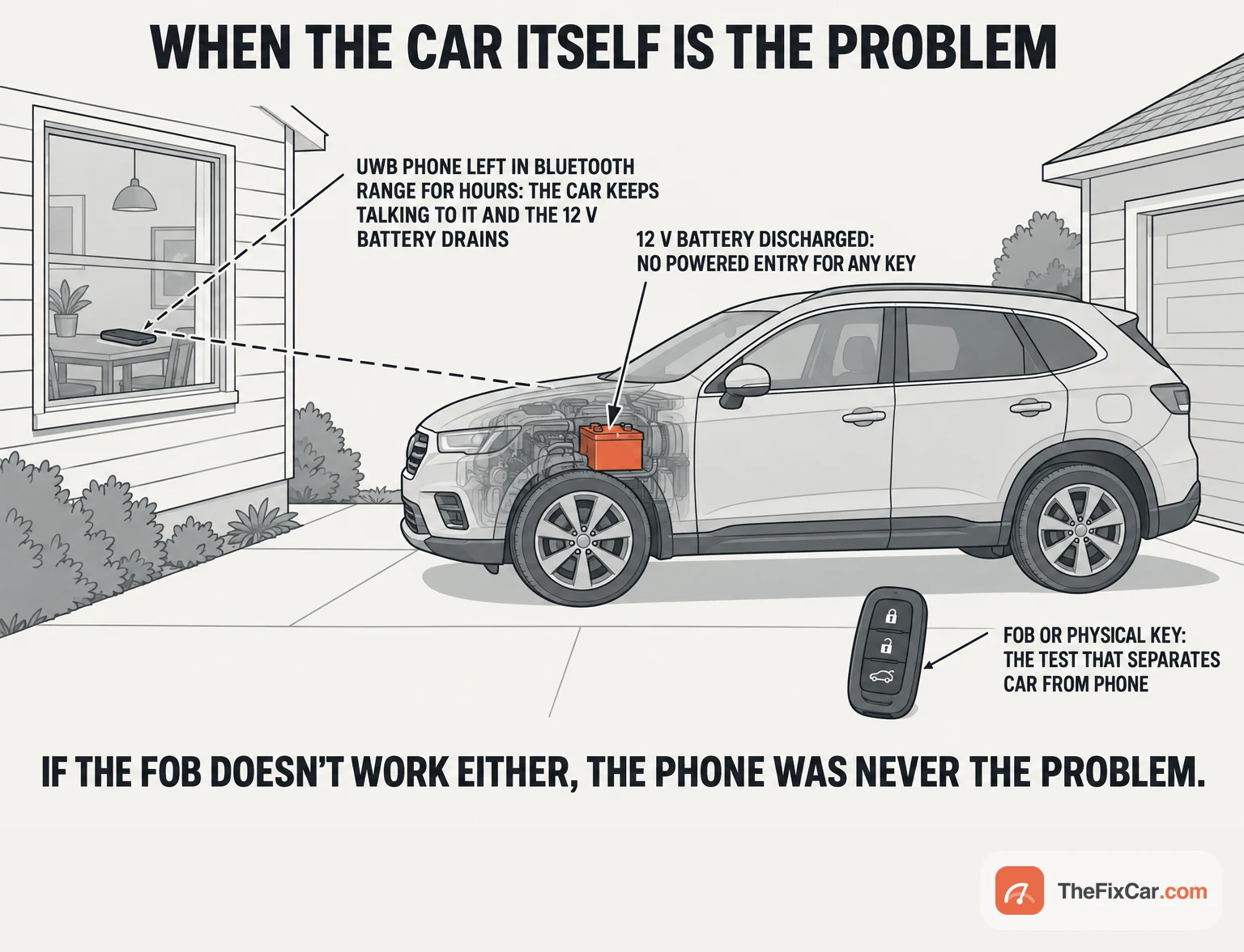
The digital key can also be the cause of the flat battery. Kia’s manual states that carrying a UWB-enabled phone registered as a digital key within the vehicle’s Bluetooth range for an extended time “may” cause low-voltage battery consumption, and its remedy is to turn passive entry off in the wallet app.[6] If the phone stays within Bluetooth range of the parked car for hours, for example when the car is parked close to the house, it fits the condition Kia describes. A vehicle software update is the other car-side item: Google and Tesla both put “update the vehicle software” ahead of re-pairing.[2][15]
Shared keys and new phones: where the key gets stuck
If a shared key has never worked, check its invitation and activation status before anything else. Google’s flow is a link the owner sends, then either a code the recipient enters on the car screen or in the wallet, or a physical-key activation in which the recipient starts the car with the shared key while the fob is inside; a wrong code is simply re-entered. Owner-key setup and shared-key activation are different procedures, so a failed invitation is handled by the recipient wallet’s sharing instructions, not by re-running the owner’s pairing.[7][10] Apple’s recipient needs the one-time activation code when the owner or the key requires one.[4] Samsung adds two limits of its own: only the car’s owner can start sharing, and a key cannot be registered on more than one phone under one account.[11] Google also notes that some cars do not remove a shared key until certain conditions are met, so removal of a shared key can take effect later than the wallet shows.[7]
A key that vanished with a new phone is, in the cases the makers document, an account event rather than a fault. Apple says signing out of the Apple Account loses the car key, and that moving to a new iPhone requires the previous device nearby and connected to the internet; marking a phone as lost turns the key off with the rest of the wallet.[4] Samsung’s rule is stricter: the key is tied to a single phone and cannot be transferred, so a new Galaxy is re-registered rather than moved. Follow the car maker’s own procedure with whatever it requires present: Hyundai Motor UK asks for both smart keys at activation, the 2023 GV60 manual for the smart key inside the car, and BMW for both physical keys in the car.[11][16][8][13]
What to check first
- Compare with the fob. If the car ignores the fob too, work on the car: its low-voltage battery, then its software, and the fob itself.[1][6]
- Phone out of its case, cards away from the back, NFC and Bluetooth enabled where the phone exposes those settings, then the phone aligned with the car’s designated reader for the hold time the car specifies. If the tap starts working after one of those changes, that change narrows the NFC checks; test the walk-up separately.[6][3]
- Passive entry on in the wallet and vehicle software current. Only then, with a working fallback in hand and the keys the registration procedure requires, remove the key and pair again as the wallet’s and the car maker’s instructions describe.[2][13][8]
Can you still get in and drive?
You can drive on a fallback the car maker approves for your car, provided the car itself starts and runs normally; a warning light or an electrical fault alongside the key problem is investigated first, not driven around. On an equipped Ford with the passcode already configured, the answer to a phone that cannot unlock the car is the keyless entry keypad on the door, then the Backup Start Passcode on the touchscreen, a code created in advance with the fob present.[14][17] Hyundai’s is a compatible NFC key card already registered to the car, which unlocks and starts it when the phone is not available.[9] Power reserve on the phone is device- and key-dependent: confirm that yours supports it and keep a configured backup anyway.[12][11]
Do not leave without a way back in:
- If the fob also fails and the car shows a low battery, sort the low-voltage battery before relying on any key to get back in.[6]
- If the phone is on its power reserve, treat the next tap as the last one and carry the card, fob or passcode.[12]
- If you are driving on a shared key, confirm it permits your intended use and will stay valid for the trip.[7]
FAQ
Why does my digital key only work when I put the phone on the charging pad?
Reader-based use may be all this phone and car support, or the walk-up path may have stopped. Check that passive entry is on and that the exact phone and car support it, that Bluetooth is on, then follow the wallet’s and the car maker’s troubleshooting; on a Google Wallet setup that is a vehicle software update, then remove and re-pair once you have a fallback.[2][6]
Why does the car unlock but not start with my phone?
Use the car’s documented start procedure. On the cited Kia it is the phone flat on the authentication pad, brake pressed, then the button, with nothing between phone and pad; a shared key also needs the right permissions. If the car recognises the key at the reader and still will not start, a separate starting fault is on the list.[3][7]
Why did my phone key stop working after I got a new phone?
Apple keys are lost on sign-out and only transfer with the old iPhone nearby and online; Samsung keys are tied to one phone and cannot be transferred at all. Samsung’s cited instructions require re-registration on the new phone; follow the car maker’s procedure with the physical keys or credentials it requires.[4][11]
Can a phone case really stop a digital car key?
Kia lists thick or metal cases, metallic covers and a credit card overlapped on the back of the phone as reasons the key may not work, and says to remove the cover and try again; Google says cards in a case between phone and reader affect pairing, unlocking and starting.[6][10]
Can a digital key drain the car battery?
Kia’s manual says a UWB phone registered as a key and left within the car’s Bluetooth range for an extended time may consume the low-voltage battery, and recommends turning passive entry off to prevent it.[6]
Why won’t a shared digital key activate?
Follow the activation method the recipient’s wallet shows for that key. Google documents a code entered on the car screen or in the wallet, or starting the car with the shared key while the physical key is inside; a wrong code is simply re-entered.[7][10]