The phone pairs the second you start the car, calls come through the speakers, music streams without a hiccup, and the CarPlay screen never shows up. That combination throws people off, because it looks like the phone and the car are already talking. They are, just not on the channel CarPlay needs. Bluetooth carries calls and streaming audio on its own low bandwidth link. CarPlay pushes an entire interface into the dashboard, so it runs over Wi-Fi on wireless systems or over a USB data connection on wired ones. Either of those can fail completely while Bluetooth keeps working like nothing happened.
Quick answer
Before anything else, find out whether your car runs CarPlay over a cable or wirelessly, because the two fail for unrelated reasons. Then pick your row:
| What still works | What does not | Where to look first |
|---|---|---|
| Bluetooth calls and music | Wireless CarPlay | Wi-Fi switched off on the iPhone, or Auto-Join off for the car’s CarPlay network |
| Bluetooth calls and music | Wired CarPlay | USB cable, USB port, or the data path behind the port |
| Phone charges on the cable | Wired CarPlay | The data lines, not the power supply: swap the cable first, then the port |
| CarPlay with a different iPhone | CarPlay with yours | Settings, Screen Time restrictions, or the saved car profile on your iPhone |
| Bluetooth with every phone | CarPlay with none of them | Head unit, USB data module, or vehicle software |
| Wired CarPlay | Wireless CarPlay | Wi-Fi radio or the wireless module in the head unit |
Treat the table as a routing aid, not a full diagnosis. Several rows can point at the same worn USB port.
Why working Bluetooth tells you almost nothing
Bluetooth working proves the phone and the car can talk to each other, and nothing beyond that. It says nothing about the connection CarPlay itself runs on, which differs depending on how your car connects. On a wireless system, Bluetooth does the introductions: it finds the phone, completes the initial pairing, and hands over the credentials for a direct Wi-Fi link between the iPhone and the head unit. Apple’s own troubleshooting steps require both radios to be on for that reason, and the Wi-Fi side does the actual work of carrying the screen and the audio. Turn Wi-Fi off and Bluetooth still connects perfectly, so calls and streaming keep working while CarPlay never appears.
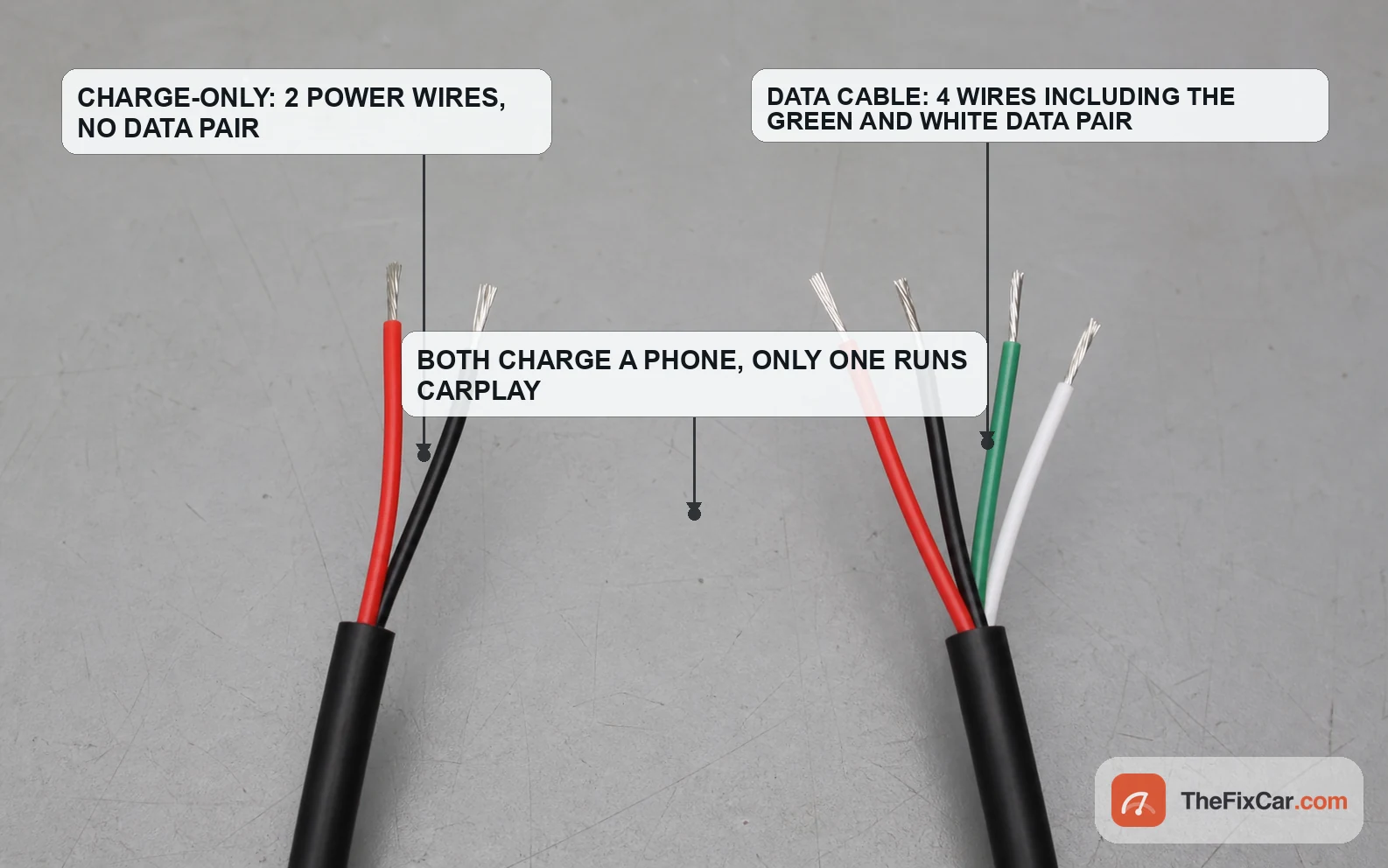
On a wired system Bluetooth plays no part in CarPlay at all, since the link runs over USB. A USB connection uses separate contacts for power and data. Charge-only cables, and some cheap cables that have degraded, skip or break the data pair entirely, which is why a phone can sit there charging normally with no CarPlay prompt. Many vehicles also fit more than one USB socket, and often only one of them is wired for data. If your Bluetooth pairing also drops out, that points somewhere else, usually the head unit itself.
Most common causes
- Wi-Fi turned off on the iPhone (wireless only): Bluetooth alone gets the handshake done but never establishes the link that carries CarPlay.
- Auto-Join disabled for the car’s CarPlay network: the phone stops rejoining automatically, so CarPlay only appears if you select it by hand.
- Charge-only or worn USB cable (wired only): power flows, the data pair does not, and the head unit never sees a phone.
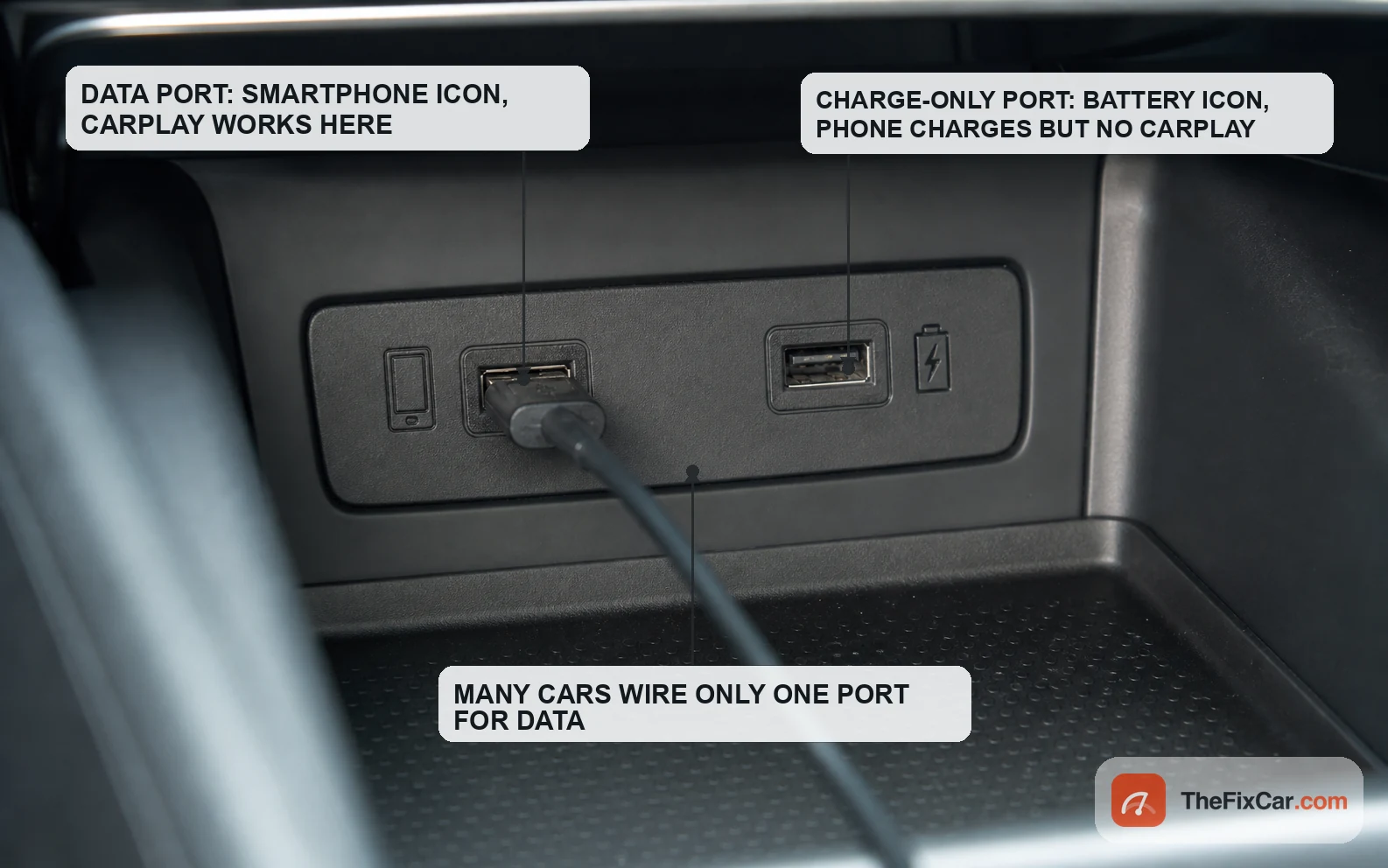
- Plugged into a power-only USB socket: on many vehicles only one port carries data, and it is not always the most convenient one.
- CarPlay blocked in Screen Time: Content and Privacy Restrictions can switch CarPlay off in Allowed Apps, which makes the car look broken.
- Siri switched off: Apple lists Siri as a requirement, and CarPlay can refuse to start without it.
- A stale saved car profile: after a phone swap, a head unit replacement, or a major update, the stored pairing can go bad and needs deleting on both ends.
- Head unit firmware or a failing USB module: usually the answer when no iPhone works while Bluetooth pairs with all of them.
What to check first
- Open Settings, then Wi-Fi on the iPhone, and confirm the radio is on. Tap the car’s CarPlay network and check that Auto-Join is enabled.
- Look at the car’s display for a CarPlay icon and select it by hand. On some vehicles the interface waits to be launched rather than starting itself.
- Try a different USB cable, ideally a short, high-quality data cable you have verified can move files to a computer; for Lightning, use an MFi-certified cable, and a different USB port if the car has one.
- Restart both ends: power the iPhone off and on, then cycle the ignition fully rather than just waking the screen.
- Check Settings, then Screen Time, then Content and Privacy Restrictions. If restrictions are on, open Allowed Apps and confirm CarPlay is enabled.
- Confirm Siri is switched on, then go to Settings, General, CarPlay, tap the car and choose Forget This Car before setting it up fresh.
Bluetooth works but wireless CarPlay does not
Start with the Wi-Fi radio, since it carries everything CarPlay shows. With Wi-Fi off the phone still pairs over Bluetooth, so nothing about the car’s behavior hints at the real problem. Once Wi-Fi is on, open the network list and look for the car’s CarPlay entry, then confirm Auto-Join is turned on for it. A single tap on Forget This Network months ago is enough to leave you launching CarPlay manually every trip, or not at all.
Airplane Mode blocks wireless CarPlay unless Wi-Fi and Bluetooth are both switched back on, which is easy to miss because everything else on the phone looks normal. If everything looks right on the phone, delete the car under Settings, General, CarPlay and remove the phone from the car’s own Bluetooth and device lists as well. Half a pairing left on one side is the usual reason a fresh setup attempt fails silently.
Bluetooth works but wired CarPlay does not
Cable and port come first, in that order, because both are cheap to rule out. Borrow or buy a cable you have watched move data, not one that has only ever charged something. Then check which socket you are using. Data capable ports usually sit in the front console and often carry a small smartphone or data icon, while sockets in the rear, in the armrest, or in a charge hub are frequently wired for power alone. Owner’s manuals name the data port explicitly on most vehicles, which beats guessing.
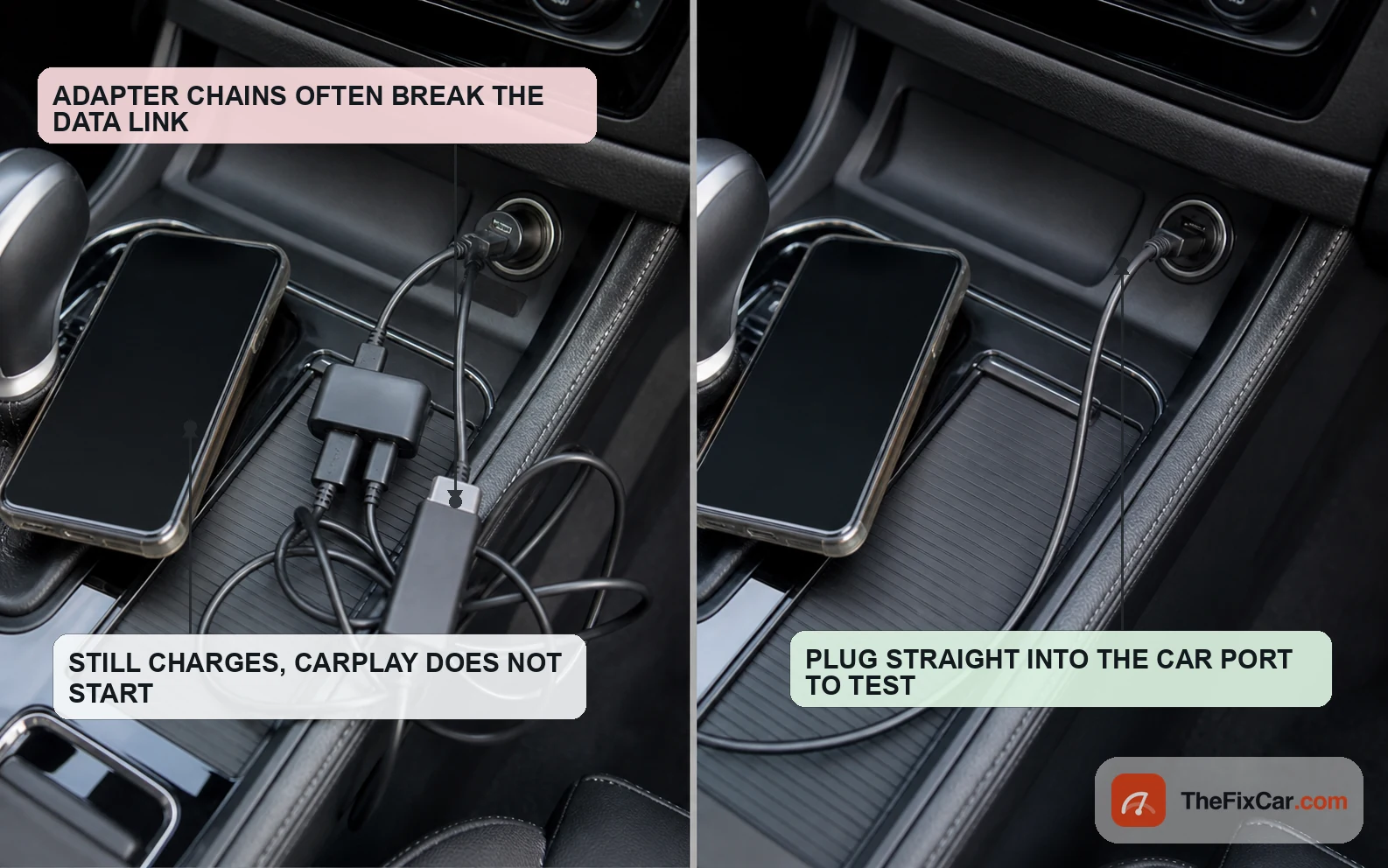
Adapters cause a surprising share of these failures. Apple notes that some combinations of adapters, cables, and vehicle systems disrupt wired CarPlay, and recommends a direct cable connection instead. A USB-C to Lightning adapter, a hub, a phone mount with a pass through connector, or an extension lead can each be the single component breaking the data link while charging still works fine.
The phone charges but CarPlay never launches
Charging proves the power conductors are intact and proves nothing about the data pair. Work through the path one piece at a time: cable, then port, then what sits behind the port. Plug the same cable into a computer, unlock the iPhone, and approve any Trust This Computer or accessory prompt that appears. If the computer still cannot see the phone as a device, the cable or the phone’s own connector becomes the main suspect rather than the car.
If a known good cable in a known data port still charges without launching CarPlay, park the car, leave the infotainment system powered on, and move the connector gently by hand. A connection that flickers or briefly appears under movement points to a worn socket rather than a software problem. On some vehicles the USB socket belongs to a separate hub or media module, so check the service information before condemning the whole head unit.
CarPlay starts, then disconnects within seconds
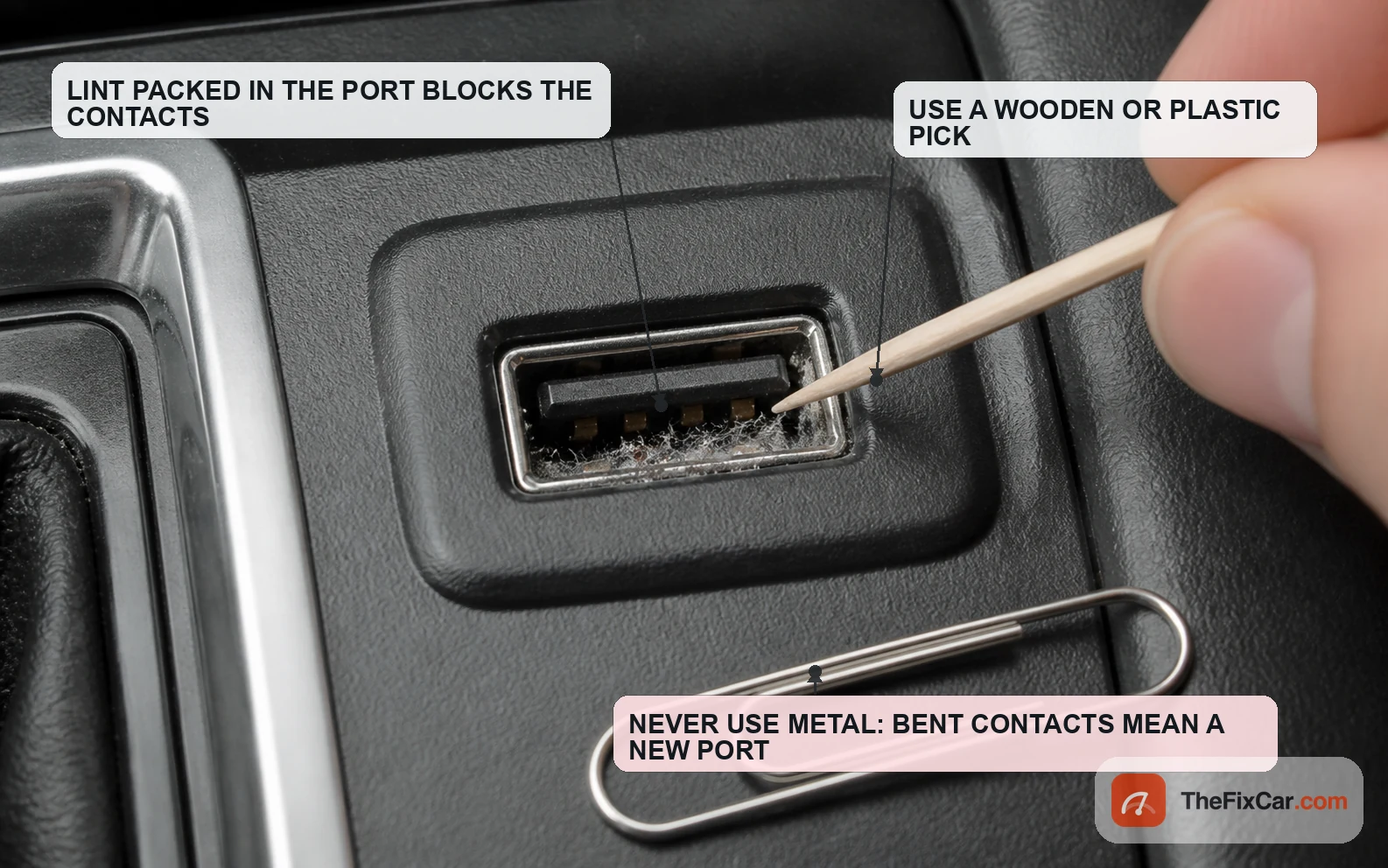
If CarPlay launches before dropping out, the problem shifts away from initial detection and toward connection stability, though a corrupted pairing or a software fault is not fully ruled out. On wired setups the usual causes are mechanical: a loose plug, lint packed into the socket, a cable whose connector has spread with age. Clean the port with a wooden or plastic pick and compressed air rather than anything metal, then test with the cable held still.
On wireless setups, start with head unit firmware, the one item Apple names directly for CarPlay trouble, since manufacturers ship stability fixes regularly. Next look at aftermarket wireless CarPlay adapters and other wireless accessories competing for the same band, then delete the pairing on both sides and set it up again. A metal-backed case or magnetic mount pressed against the phone can affect the link on some setups, so try the phone in a different position before calling it a hardware fault. If audio also breaks up through the speakers on Bluetooth, treat it as a wider audio fault and check whether the sound itself is distorting rather than chasing CarPlay alone.
It works with another iPhone, or with none of them
Borrow a second iPhone; this quickly separates a phone-side fault from a vehicle-side fault. If the borrowed phone runs CarPlay normally, the car, the cable, and the port are all doing their jobs, and the problem lives in your handset: restrictions, a corrupted saved profile, an incomplete iOS update, or Wi-Fi and Siri settings. Delete the car from Settings, General, CarPlay, restart, and set it up as if the vehicle were new to you.
If no iPhone works while Bluetooth pairs with every one of them, suspicion moves firmly to the vehicle: head unit firmware, the USB data module, or the infotainment software as a whole. Check the automaker’s service information, or ask the dealer whether a newer infotainment firmware version is available for your vehicle. The same conclusion applies if CarPlay disappeared right after a head unit swap or a new USB hub was fitted, where wiring and compatibility are the obvious first suspects rather than anything on the phone.
Settings that look like a broken head unit
- Screen Time restrictions: CarPlay sits in Allowed Apps and can be switched off there, often by someone setting up parental controls.
- Siri disabled: Apple treats Siri as part of the CarPlay requirement, so turning it off can stop the interface from starting.
- Auto-Join off for the CarPlay network: the connection still works if you select it manually, which makes the fault look intermittent.
- Airplane Mode or a disabled Wi-Fi radio: wireless CarPlay will not start unless Wi-Fi and Bluetooth are both enabled.
- Driving Focus or Do Not Disturb rules: these do not block CarPlay itself, but they suppress the notifications people use to judge whether it connected.
- A dealer or valet setting on the head unit: some vehicles let smartphone projection be disabled in the infotainment menu, sometimes as part of a rear seat or passenger restriction.
Is it safe to drive?
Usually yes, if the only symptom is CarPlay not launching while Bluetooth, radio, gauges, and the reversing camera still work normally. Do not keep using a hot, loose, burnt-smelling, or erratic USB port. The genuine risk sits elsewhere: drivers who keep prodding the phone or the touchscreen trying to force a connection while moving. NHTSA’s driver distraction guidance is built around keeping eyes off the road to a couple of seconds at a time, and repeated menu diving blows straight past that. Sort it in a parked car, and fall back to Bluetooth audio for the trip.
Do not do this
- Do not troubleshoot while driving. Pull over first, because tapping through phone menus at the wheel is exactly the visual and manual distraction NHTSA warns about.
- Do not disconnect the 12V battery as a reset. Avoid it unless the owner’s manual or a service procedure calls for it, since stored codes and system settings can be lost.
- Do not clean a USB port with a metal pin or paperclip. Bent or shorted contacts turn a cheap fix into a module replacement.
- Do not assume the cable is fine because it charges. Charging says nothing about the data pair, and a power-only or damaged cable is one of the first things to rule out on a wired system.
- Do not buy a replacement head unit before testing a second iPhone and a known good cable. Both take minutes and both frequently end the investigation.
- Do not stack adapters, hubs, or extension leads on a wired connection while diagnosing. Test with the phone plugged straight into the car.
When the problem is urgent
- The USB port feels hot, smells of burnt plastic, or shows scorching. Stop using it and have the circuit checked.
- The phone charges erratically or stops charging in the same port. Suggests a fault in the port or its wiring rather than CarPlay.
- The head unit reboots on its own, freezes, or loses the reversing camera. Points at the infotainment module, and a lost camera feed is a real safety issue on many vehicles.
- The plug feels loose or falls out under normal movement. Worn contacts can overheat or damage the socket, so replacing the port sooner is the cheaper path.
- CarPlay stopped right after a collision, water ingress, or aftermarket wiring work. Treat it as a wiring inspection, not a settings problem.
- Bluetooth, radio, and CarPlay all degrade together. Suggests the head unit or its power supply, not the phone connection.
Typical repair cost
- Apple certified USB cable: commonly $15 to $30, and the fix in a large share of wired cases.
- USB port cleaning at a shop: often $0 to $60, sometimes waived if you are already in for other work.
- Infotainment software or firmware update at a dealer: workshop estimates commonly run $0 to $180, and some manufacturers cover it under warranty or goodwill.
- USB port or data module replacement: typically $40 to $150 for the part plus roughly $80 to $220 labor, depending on how deeply the console has to come apart.
- Wireless CarPlay adapter for a wired-only car: generally $40 to $130, an accessory rather than a repair.
- Aftermarket head unit with CarPlay, installed: commonly $300 to $1,100 all in, and a common route on older vehicles.
- OEM head unit replacement: frequently $700 to $2,500 or more, usually a last resort after firmware and USB hardware are ruled out.
Ranges are rough U.S. editorial estimate figures before tax and diagnostic fees. Warranty status, vehicle model, whether the port sits on a separate module, and local labor rates all move the price.
FAQ
Why does my Bluetooth work but CarPlay doesn’t? Because they run on different connections. Bluetooth handles calls and streaming audio on its own link, while CarPlay needs either Wi-Fi (wireless systems) or a working USB data connection (wired systems). Switching Wi-Fi off, or using a charge-only cable, kills CarPlay and leaves Bluetooth untouched.
Why does my phone charge in the car but CarPlay won’t connect? A USB cable carries power and data on separate conductors. Charge-only cables and worn cables often lose the data pair while power keeps flowing perfectly, and some USB sockets in a car are wired for charging alone. Test the same cable on a computer: if the computer only charges the phone and never sees it as a device, you found the fault.
Does CarPlay use Bluetooth or Wi-Fi? Wireless CarPlay uses both. Bluetooth handles discovery and pairing, then hands off to a direct Wi-Fi link between the phone and the head unit that carries the screen and audio. Apple’s troubleshooting steps ask you to confirm both radios are on for exactly that reason. Wired CarPlay uses neither, running entirely over the USB data connection.
Do I need cellular data or Wi-Fi service for wireless CarPlay? No. The Wi-Fi involved is a direct peer to peer link between the iPhone and the car, not a connection to a router or the internet. Individual apps such as maps and streaming still need your cellular data, but CarPlay itself connects fine in a parking garage with no signal at all.
Why did CarPlay stop working after an iOS update or a new phone? The saved pairing on either side can go stale. Delete the car under Settings, General, CarPlay on the iPhone, then remove the phone from the car’s own Bluetooth and paired device lists, restart both, and set it up fresh. Removing it from only one side is the usual reason the second attempt fails too.
Can a bad USB cable stop CarPlay from working? Yes, and a bad, incompatible, or power-only cable is one of the first things to rule out on a wired system. Cables degrade at the connector long before they stop charging, so a cable that worked last month can drop its data link while still delivering full power. Keep one known good cable in the car purely for CarPlay.
Why does CarPlay keep disconnecting and reconnecting? Once CarPlay has appeared at least once, the fault usually sits in connection stability rather than in initial detection. On wired setups look for a loose or dirty port and a tired cable; on wireless setups start with head unit firmware, then aftermarket adapters and other wireless accessories. Moving the connector gently with the car parked and the screen powered on usually separates a mechanical fault from a software one.