Music that turns fuzzy, crackly, or muffled through one or more speakers is one of the most common car audio complaints, and it rarely means the whole system is dead. The sound itself points to the fault: a speaker that has physically failed sounds different from an amplifier being pushed past its limit, which sounds different again from a loose speaker connection making intermittent contact behind the door panel. Read the distortion before you spend a cent.
Quick answer
Distortion from one speaker at low and moderate volume strongly points to speaker damage. Distortion that shows up only when the system gets loud more often points to clipping, too much cone movement, a wrong crossover setting, or a loose panel, though it does not fully rule out a damaged speaker. It is safe to keep driving, but sustained distortion at high volume can finish off a marginal speaker, so ease off. A simple wiring or gain fix can be free; replacing a basic coaxial door speaker is commonly about $30 to $150 for the part, or about $80 to $300 per side with shop installation.
What the distortion tells you
Use the sound as a rough first sort, not a final diagnosis.
| What you hear | Likely source | What it means |
|---|---|---|
| Breakup only at high volume | Amp or head-unit clipping | Electronics run out of clean power; back off gain and bass |
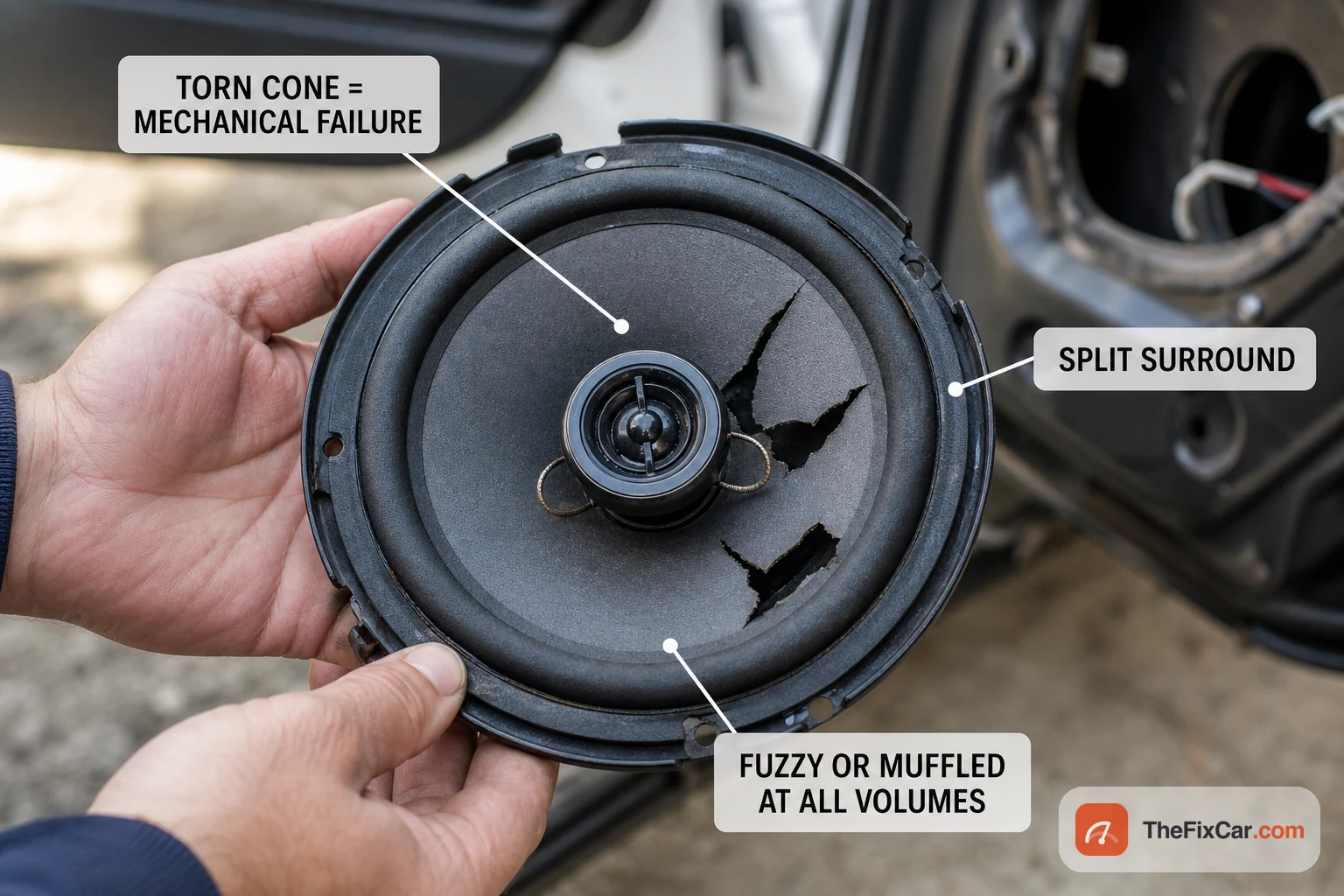
| Fuzzy or muffled at all volumes | Blown or torn speaker | Cone, surround, or voice coil is damaged |
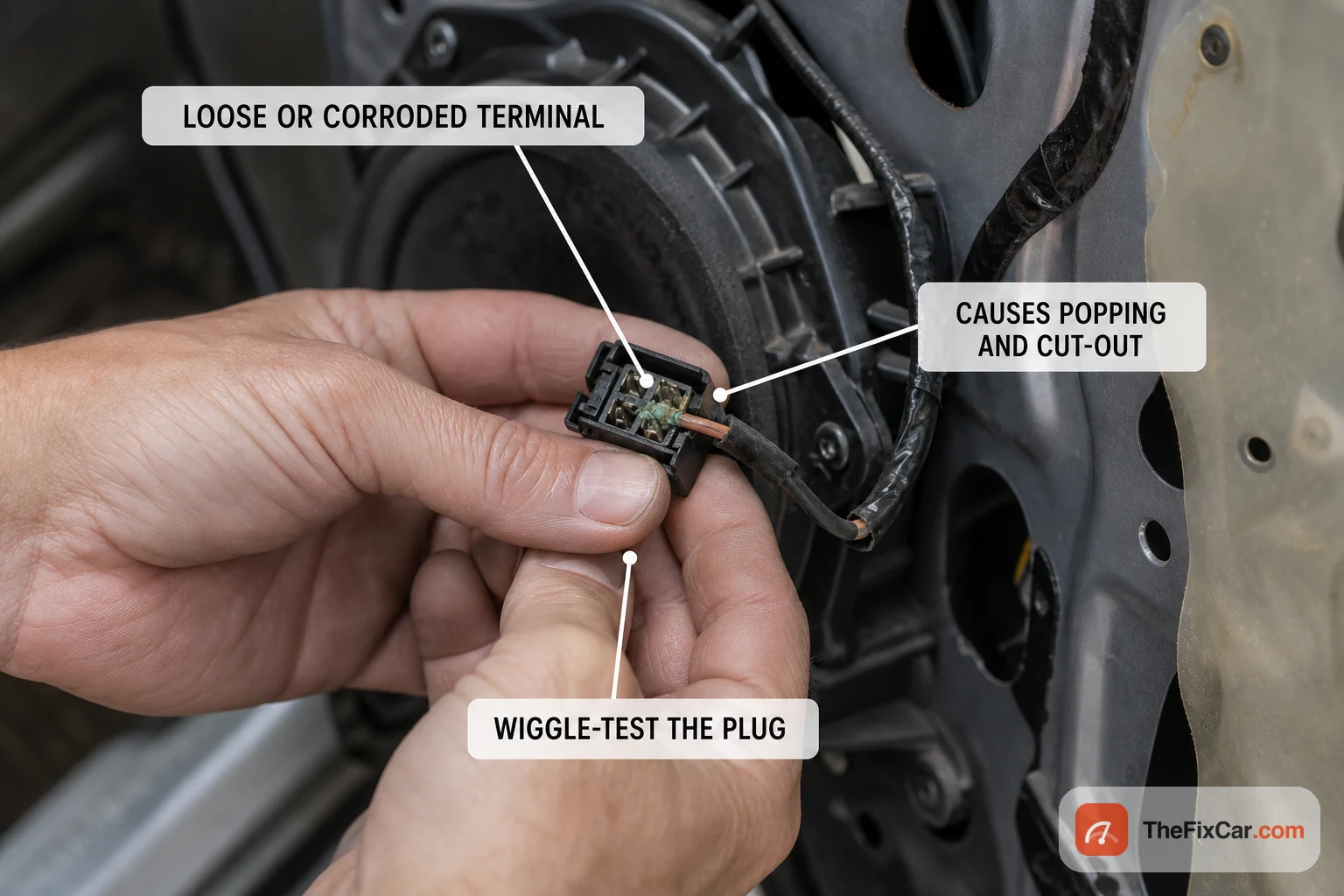
| Static, popping, or cutting out | Loose or corroded wiring, bad ground | The signal path is interrupted, often when you hit a bump |
| Distortion after rain or damp | Moisture in the speaker | A wet cone or corroded terminal loses fidelity |
| One speaker or channel only | Wiring, amp channel, or that driver | Isolate it with the swap test below |
| Rattle only on bass notes | Loose trim, speaker mount, or torn surround | Work out whether it comes from the driver or the panel around it |
| Scraping that follows the cone | Voice-coil rub | The coil or suspension may be mechanically damaged |
| Deep popping or flapping from a sub | Too much excursion or torn suspension | Reduce gain first, then inspect the subwoofer |
| Whine that rises with engine RPM | Grounding or charging-system noise | Electrical noise, not usually a blown speaker |
Most common causes
- Amplifier or head-unit clipping: pushed past its clean output, the amp clips the waveform peaks into a squared-off shape, which reads as harsh breakup and heats the voice coil.
- Blown speaker: a torn cone, split surround, or damaged voice coil may produce a fuzzy, rattly, or muffled sound that persists across different sources and often gets more obvious as cone movement increases.
- Loose or corroded wiring: a poor connection at the speaker terminal, harness, or ground makes the sound pop, cut out, or crackle, often in time with bumps.
- Bass and EQ set too aggressively: heavy bass boost or loudness pushes small door speakers past what they can handle and distorts the low notes.
- Failing head unit or amplifier: an aging unit can distort on its own before the speakers are ever at fault.
- Moisture damage: water down the door or a leaking seal soaks the cone or corrodes the terminals and dulls the output.
- Low-quality source: a heavily compressed file or a weak Bluetooth stream can sound distorted before the car’s hardware touches it.
What to check first
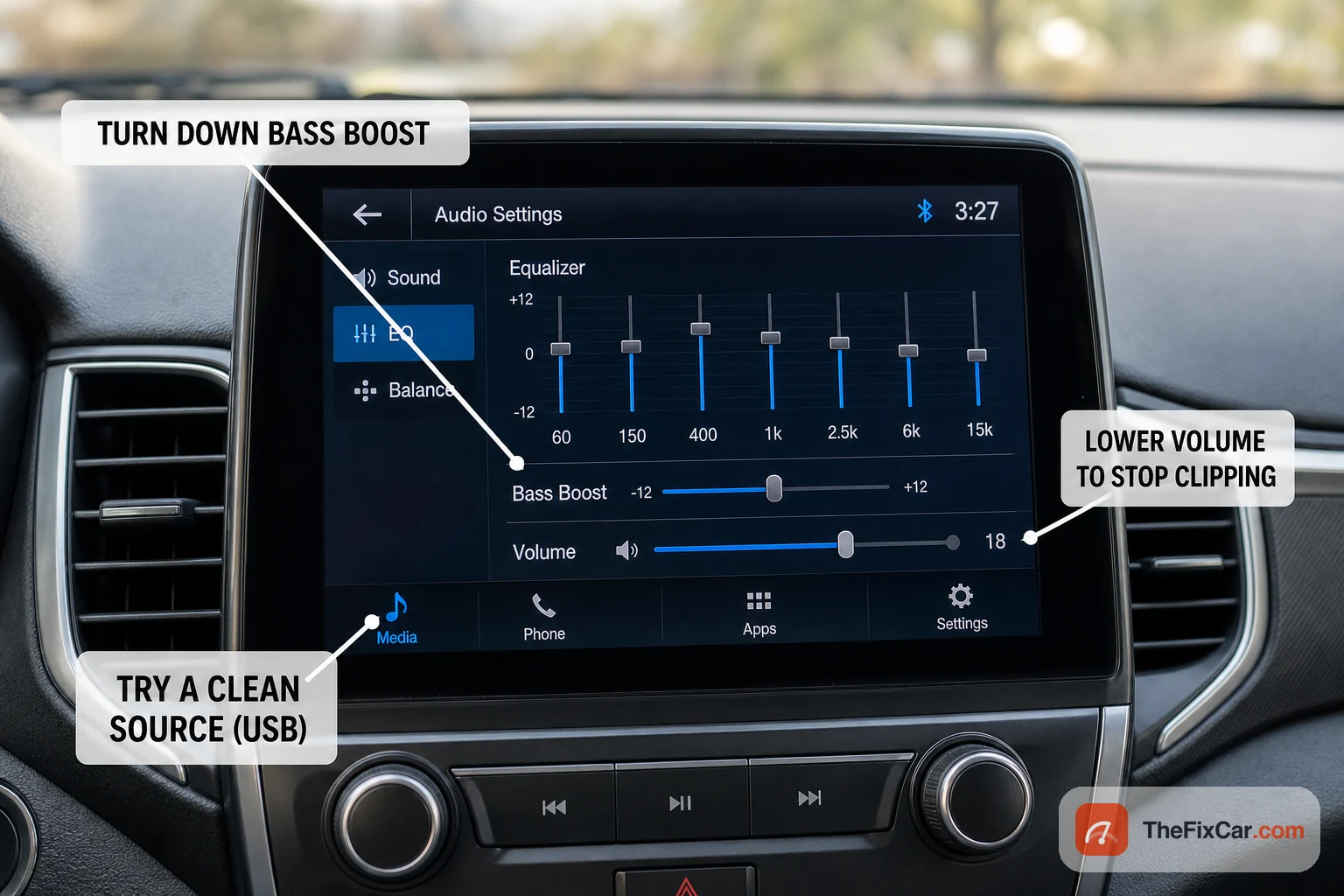
- Turn the volume down and lower any bass boost, loudness, or EQ presets. If that clears it, clipping or too much cone movement is the more likely cause; a marginal speaker can still distort only when it is asked to move farther.
- Try a different source and track. Switch from Bluetooth to USB or radio, or play a known clean file. If only one source distorts, the problem is upstream, not the speaker. Our guide on why a phone will not connect or streams poorly over car Bluetooth covers the source side.
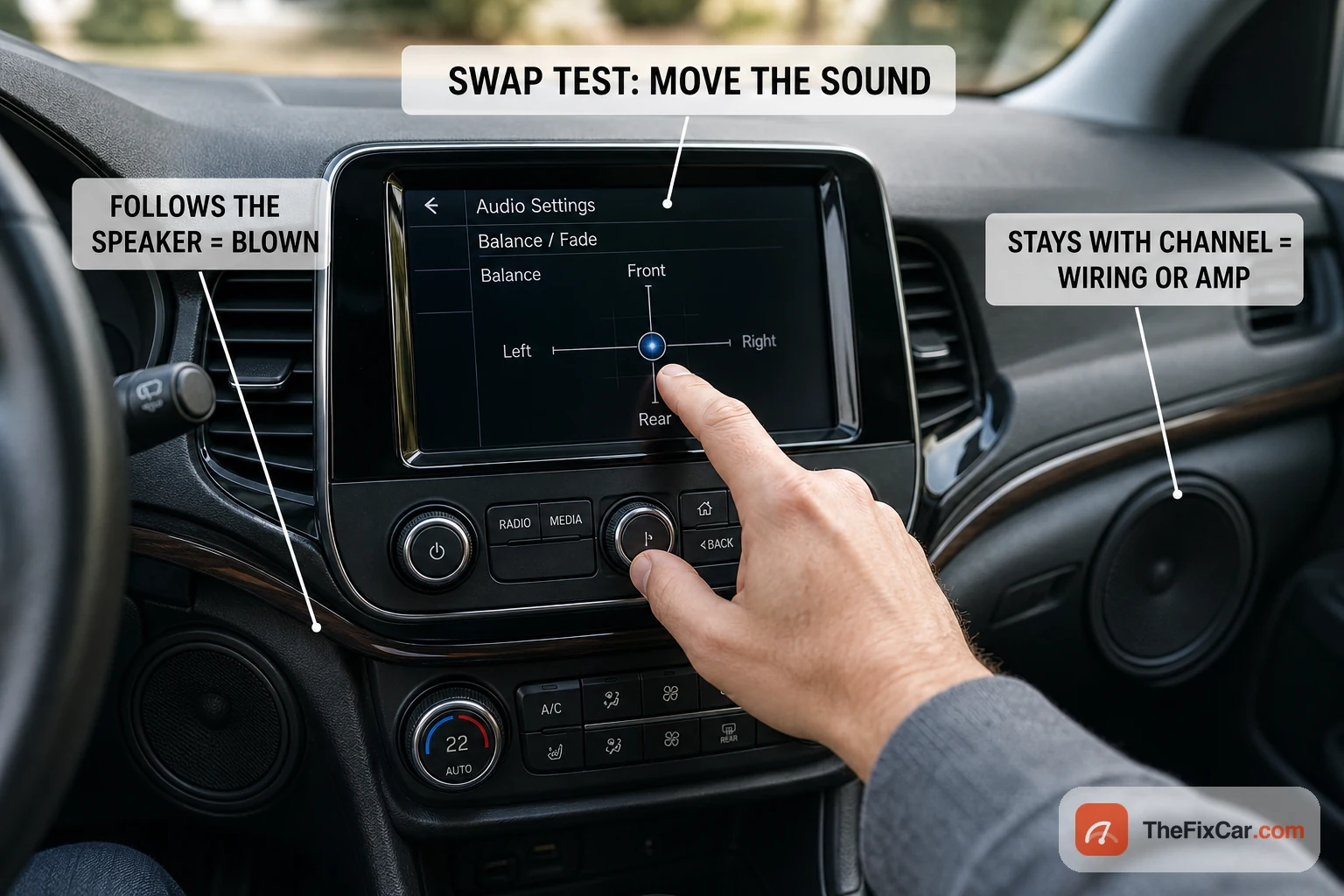
- Use the balance and fade controls to isolate which corner distorts. For a real swap test, turn the audio system off before touching any speaker wiring, then connect a known-good speaker of compatible impedance to the suspect full-range channel. Do not swap factory tweeter, woofer, bridged-amplifier, or subwoofer outputs unless you know how that system is wired. If a known-good, compatible speaker also distorts on the suspect channel, inspect the wiring or amplifier channel. If the original speaker distorts when moved to a known-good, compatible channel, the speaker itself is at fault.
- Press gently on the suspect door panel or grille while it plays. A change in the sound points to a loose speaker or panel, not a blown cone.
- Check the connections. Wiggle the speaker plug and inspect the terminals for green corrosion or a loose ground. A meter can find an open or shorted speaker lead; continuity alone does not prove the speaker is healthy. See how to use a multimeter for basic 12V checks.
One speaker or all of them?
Whether one speaker distorts or every speaker does narrows the fault fast.
If only one speaker distorts, look at:
- damage to that specific driver
- a wet door speaker after rain or a bad seal
- its connector or a corroded terminal
- the wire where it flexes in the rubber door boot
- one channel of the amplifier
- a rattling door card near that speaker
If every speaker distorts, start with:
- a poor recording or a low-bitrate stream
- the head unit clipping
- amp gain set wrong
- the shared amplifier
- weak amplifier power or ground
- a wrong DSP or EQ curve
Every speaker failing at once is far less likely than a shared problem in the head unit, amplifier, or signal path, so suspect the source and the electronics first.
Is the speaker blown or is the door panel rattling?
A buzz or fart on bass notes is often the trim around the speaker, not the speaker itself. People hear it, buy a new speaker, and the loose door card was the culprit the whole time. Sort this out before you spend anything.
- Play a track where the noise repeats the same way every time.
- Use balance and fade to leave only the problem corner playing.
- Drop the bass and check whether the noise goes with it.
- Press gently on the grille, door card, door pocket, and handle in turn.
- Check the speaker mounting screws for looseness.
- Look for a wire touching the back of the cone.
- For a subwoofer, press on the enclosure, the trunk trim, and the license plate.
Why does my car subwoofer rattle, flap, or sound blown?
A subwoofer moves far more air than a door speaker, so it fails in its own ways, and many “blown sub” complaints turn out to be a setting or a loose panel rather than a dead driver.
Common causes:
- a torn or separated surround
- a cracked cone
- a loose dust cap
- a separated spider
- a rubbing or overheated voice coil
- the sub bottoming out on the deepest notes
- gain or bass boost set too high
- the crossover set too low or incorrectly
- loose subwoofer mounting screws
- a loose wire inside the enclosure
- a flexing, leaking, or cracked box
- trunk trim or the license plate rattling instead of the sub
| What you hear | What it usually is |
|---|---|
| A pop only on the deepest notes | Too much excursion or bottoming out |
| A scrape or grind on almost any bass note | Voice-coil rub |
| The buzz stops when you press the box or trim | Mounting, enclosure, or trim, not the sub |
| Weak bass and new distortion together | Surround, cone, or coil damage |
| Distortion that started after you set the amp | Gain, bass boost, crossover, or clipping |
A gain set too high causes distortion and can wear a sub out early. If you change bass boost, recheck the amplifier output and gain for clipping. For the initial setup, leave bass boost off.
Distortion after installing speakers or an amplifier
Aftermarket audio adds two faults a factory system rarely has: small door speakers fed bass they cannot handle, and a speaker load below what the amplifier can safely drive. Check the basics before you blame the hardware.
- correct speaker impedance for that amplifier
- correct polarity and wiring
- gain set by ear or with test tones, not treated as a volume knob
- a high-pass filter on small door speakers
- a low-pass filter on the subwoofer
- no bass boost during the first setup
- stable amplifier power and a solid ground
Do premium factory audio systems change the diagnosis?
A badge like Bose, JBL, or Harman Kardon on the grille does not tell you which part failed, and it does not mean two cars with the same brand share the same hardware. The same audio brand can use different speakers, amplifiers, impedances, and signal paths depending on the automaker, model, trim, and year. In systems equipped with a dedicated amplifier, DSP, a digital audio network, or noise cancellation, the fault often sits somewhere other than the speaker you can see.
| System or design | What may be different | How it changes diagnosis |
|---|---|---|
| Factory amplified with DSP (some Bose, JBL, and Harman Kardon options) | A separate amplifier and DSP handle equalization and channel routing | Several speakers distorting at once points more to the shared amplifier or DSP than to many speakers failing together |
| Digitally networked systems (optical MOST or an audio data bus, seen on some premium platforms) | Audio travels as data over fiber or a digital pair, not analog speaker wire | You cannot diagnose by probing the speaker wire; a network or wake-up fault can mute or distort output, and any upgrade needs the correct interface |
| Low-impedance or application-specific factory speakers | Drivers may run below the usual 4 ohms and lean on factory equalization | Dropping in a standard aftermarket speaker can lower the volume, shift the tone, or load the amplifier differently, so a worse sound is not always a defect |
| Active noise cancellation or engine-sound enhancement | The system deliberately plays low-frequency signal through the speakers | After an aftermarket sub or speaker change you may hear booming, pulsing, or feedback; the noise cancellation may need to be kept or recalibrated |
| Center channel, under-seat woofer, or factory subwoofer | Extra dedicated drivers you may not notice | A rattle or weak output blamed on a door speaker can actually come from one of these |
What to check before replacing a branded factory speaker
- Identify the exact factory audio option by VIN, build sheet, or the label on the amplifier, not by the grille badge.
- Work out whether the speaker is driven straight from the radio or through a separate amplifier.
- Verify the speaker impedance before buying a replacement.
- Isolate the affected channel with balance and fade, and test more than one source.
- Check whether several speakers share one amplifier output or processing path.
- Inspect the speaker, mounting adapter, door trim, connector, and moisture barrier.
- Do not probe or cut optical or networked audio circuits without the correct service procedure.
- Confirm whether active noise cancellation must be kept, recalibrated, or disabled after an audio change.
Aftermarket gear from Alpine, Pioneer, Kenwood, Sony, Kicker, Rockford Fosgate, or JL Audio is not diagnosed by the brand on the box. The same setup checks apply to all of them: gain, high-pass and low-pass crossovers, bass boost, speaker and subwoofer impedance, wiring polarity, bridged wiring, enclosure condition, amplifier power and ground, and clipping. Brand name alone is not enough to diagnose distortion; system design, installation, settings, and the specific failed component matter more.
Is it safe to drive?
Speaker distortion by itself is not normally a mechanical driving-safety issue, so the car is generally fine to drive. A burning smell, a repeatedly blown fuse, hot wiring, or other electrical symptoms are the exception and need immediate attention. The other real risk is to your ears and the speaker. Cranking a distorted system to hear over the fuzz pushes it harder and can finish off a speaker that was only marginal, and prolonged loud, distorted audio is a genuine hearing hazard, not just an annoyance. Keep the volume moderate until the fault is fixed.
Do not do this
- Do not turn the volume up to overcome the distortion; that accelerates the damage.
- Do not assume every distorted speaker is blown before running the swap test.
- Do not leave heavy bass boost on with small factory door speakers.
- Do not poke a screwdriver or wire into a cone to test it; you will tear it.
- Do not ignore green corrosion or a wet door card; moisture spreads to the harness.
When the problem is urgent
- A burning or hot-plastic smell from a speaker or the amp: turn the audio off immediately; if you can do so safely, pull the audio fuse or disconnect the aftermarket amp power lead, then have the circuit inspected.
- Distortion paired with a blown audio fuse that keeps failing: a short in the wiring.
- Sound cutting out along with flickering dash lights: an electrical fault beyond the audio, not just a speaker.
- Water visibly pooling in the door or footwell: fix the leak before it reaches more wiring.
Typical repair cost
- Reconnect or clean wiring and grounds: often free as a DIY job; commonly about $40 to $90 at a shop.
- Retune the amp gain and EQ: free if you do it; roughly $50 to $100 for a shop to set gains by ear or scope.
- Replace a single coaxial door speaker: parts commonly $30 to $150, with install around $50 to $150 per side.
- Replace a component speaker set: parts typically $80 to $400 or more, plus install.
- Replace a failing head unit or amplifier: commonly $80 to $500 and up for the unit, before labor.
Costs here are rough U.S. figures; vehicle, speaker grade, and local labor rates move the price.
Why do my speakers distort only at high volume?
That often points to clipping, but a small door speaker can also bottom out or make a loose panel buzz at high volume. Lower the volume, amp gain, bass boost, and loudness setting first. If the distortion clears, the electronics or settings were the limit; if one corner still rattles earlier than the others, inspect that speaker, mount, and door panel.
Can a blown speaker fix itself?
No. A torn cone, split surround, or overheated voice coil is physical damage that does not heal. Distortion that comes and goes usually points to wiring, a connection, or clipping rather than a truly blown driver, which is worth confirming before you buy new speakers.
Does distortion always mean I need new speakers?
Often not. Loose wiring, a bad ground, aggressive EQ, clipping, and a poor audio source all distort perfectly good speakers. Work through the source, settings, wiring, and swap test first; replace the speaker only once you have confirmed the driver itself is the fault.