Your phone shows the car in its Bluetooth list, you tap it, and nothing happens, or the car never appears at all, or it pairs once and then refuses to reconnect the next morning. Bluetooth that will not connect to the car is usually a settings, pairing-list, or software handshake problem before it is a broken part, which is why the same fix order works across most makes. The trick is knowing whether the block is on the phone, in the car, or in the pairing list that filled up months ago.
Quick answer
Start by deleting the pairing from both the phone and the car, then pair again from the car’s Add Device menu. If that fails, find your situation in the table below and start there.
| What happens | Likely cause | Do first |
|---|---|---|
| Car not in the phone’s list | Car not in pairing mode | Open Add Device on the car, then scan on the phone |
| Pairing fails or times out | Full list or wrong PIN | Delete old devices in the car, retry with PIN 0000 or 1234 |
| Paired but no audio or calls | Wrong Bluetooth profile | Enable both phone and media audio for the device |
| Drops or will not reconnect | Stale link or old software | Forget on both sides, update software, re-pair |
Use this as a starting point. The same symptom can have more than one cause, and steps vary slightly by phone and infotainment system.
Most common causes
- Stale pairing: a half-finished or corrupted pairing record makes the phone and car see each other but refuse to complete the link.
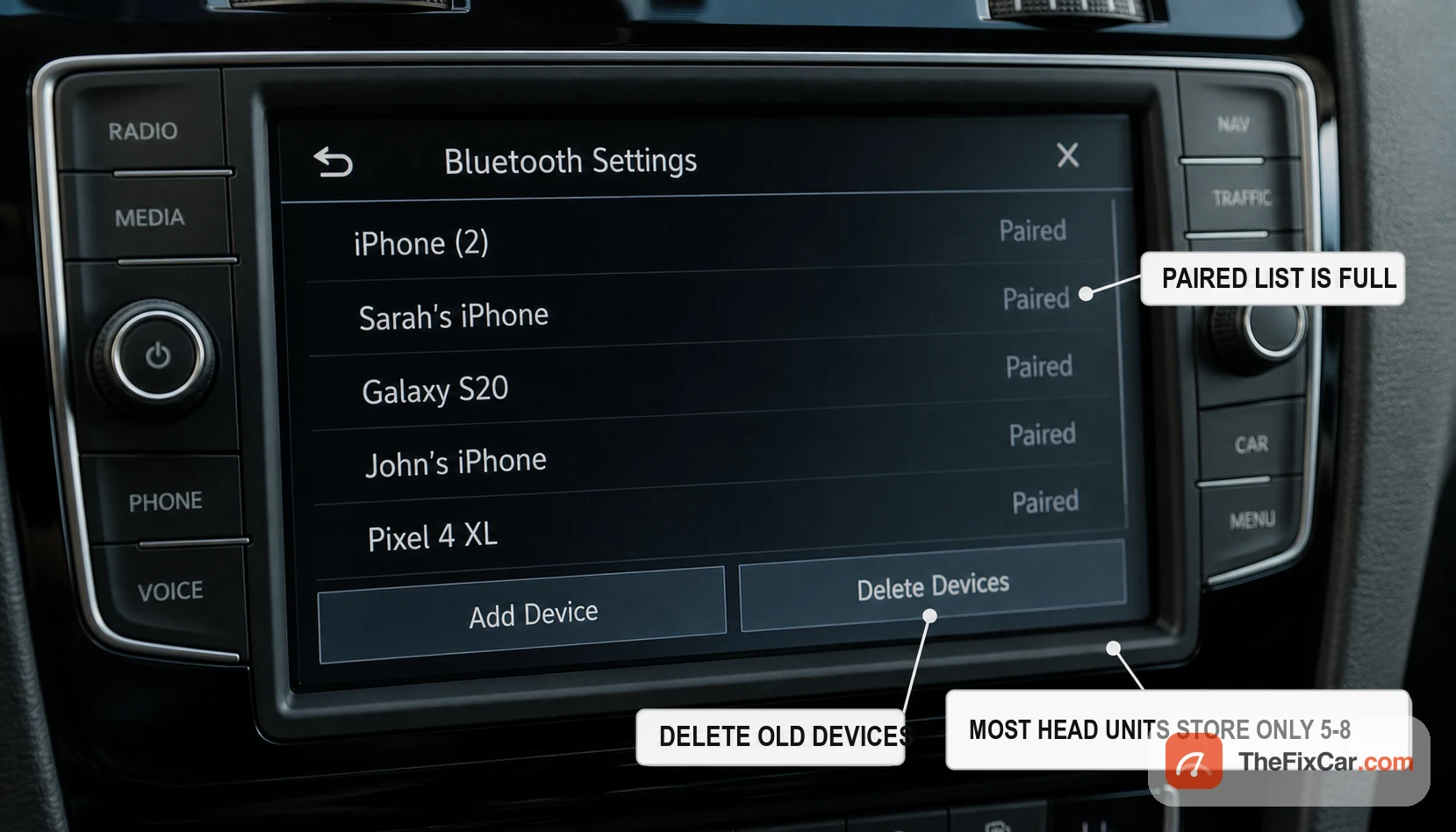
- Paired list is full: some head units keep only a small number of saved phones and reject new ones until you delete old entries; check the owner’s manual for the exact limit.
- Phone connected elsewhere: the phone is already linked to earbuds, a watch, or another car, so it will not join the head unit.
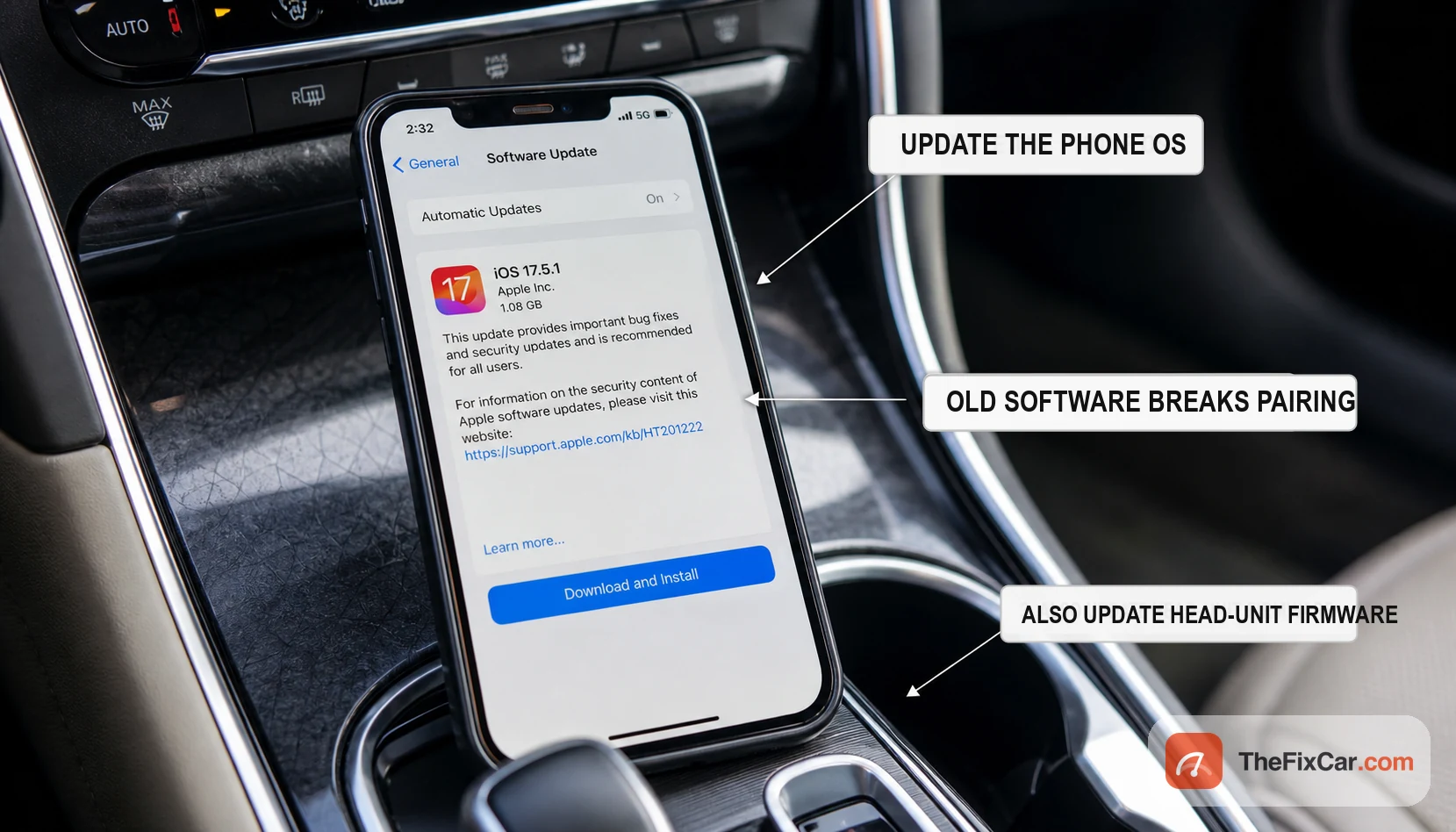
- Outdated software: an old phone OS or old head-unit firmware can break compatibility, especially after a big phone update.
- Wrong profile selected: the device is paired for phone calls but media audio is switched off, or the reverse, so part of it seems dead.
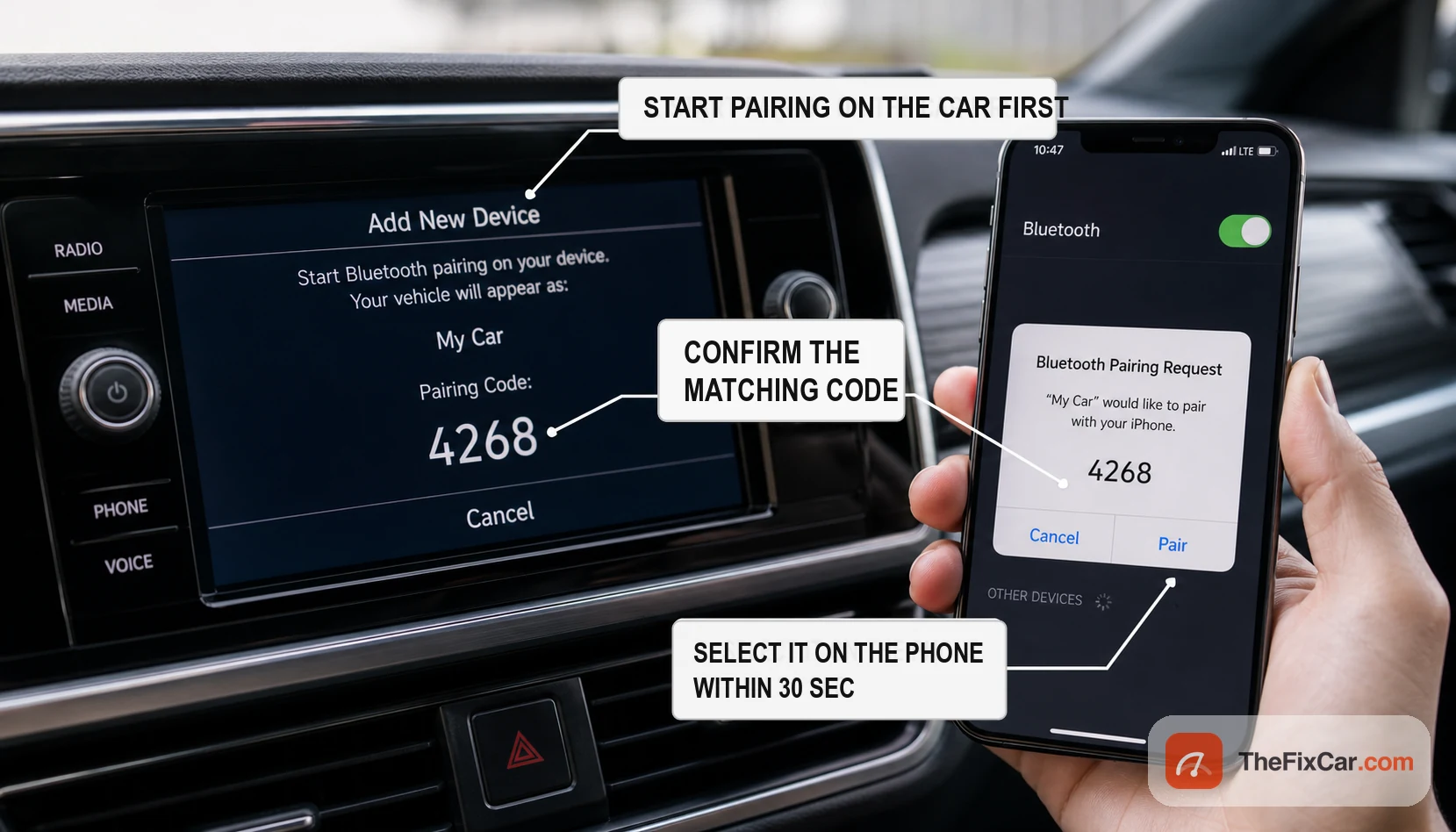
- Discovery timed out: pairing mode only stays open about 30 to 60 seconds, and the window closed before the phone responded.
- Weak 12V battery or a recent disconnect: a flat or replaced battery can wipe the head unit’s stored pairings and settings, often alongside a battery warning light.
What to check first
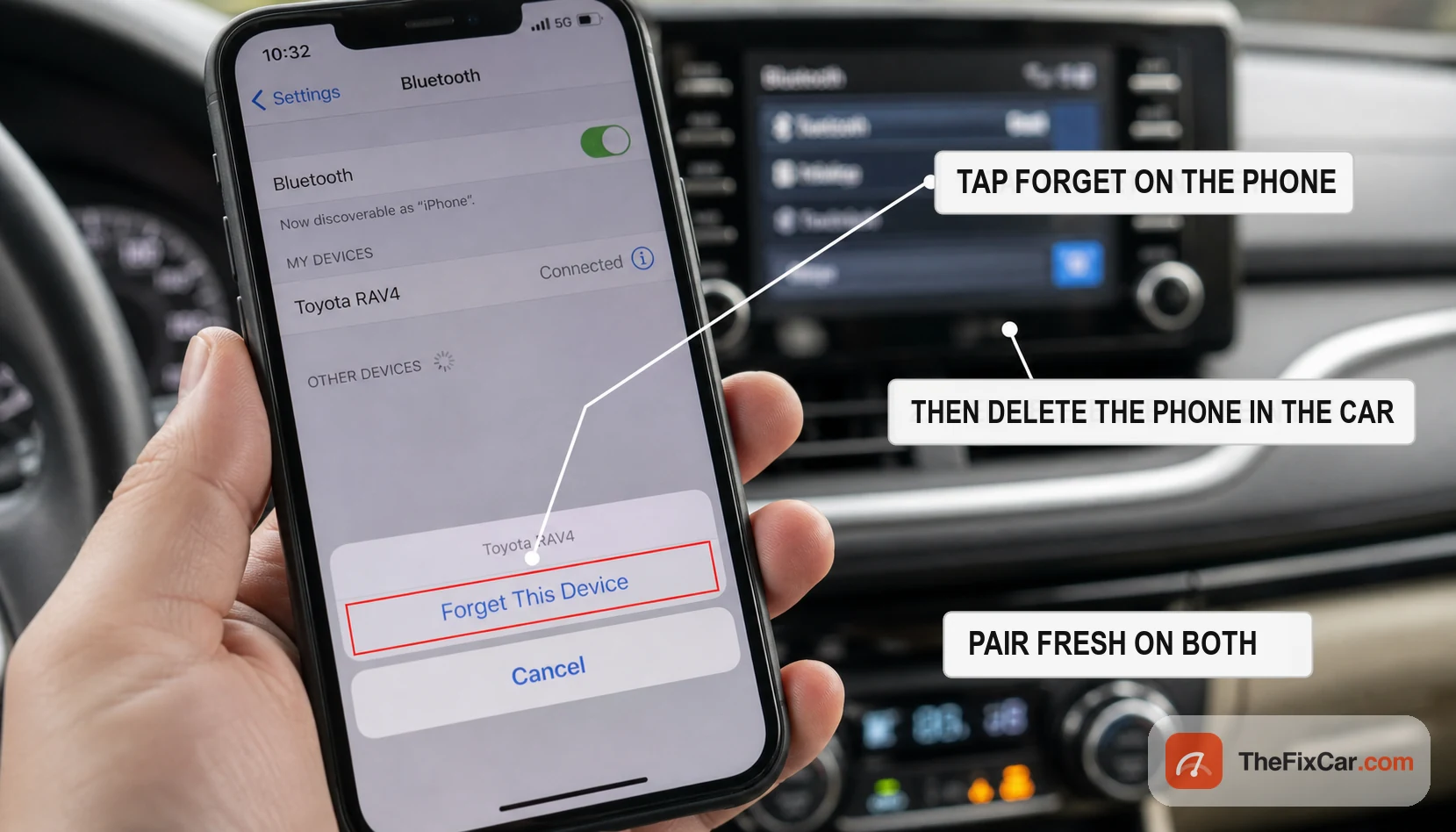
- Forget and re-pair. Delete the car on the phone and delete the phone in the car’s Bluetooth menu, then start a fresh pairing on both at once.
- Clear the car’s device list. If it is full, remove old or duplicate phones so the head unit will accept a new one.
- Start pairing on the car, not the phone. Open Add New Device on the dash first, then select the car on the phone within 30 seconds.
- Toggle and reboot. Turn Bluetooth off and on, then restart the phone; many one-time glitches clear here.
- Check the profiles. In the car’s device settings, confirm both phone audio and media audio are enabled for your handset.
- Update software. Install any pending phone OS update and ask a dealer or check the maker’s site for an infotainment firmware update.
iPhone vs Android checks
- iPhone: make sure Bluetooth is on, the car is in pairing mode, and the car is removed from both Bluetooth and CarPlay settings before you pair again.
- Android: toggle Bluetooth off and on, restart the phone, forget the car, then pair again from the car’s Add Device menu.
- After a phone update: delete the old pairing on both sides and check for a head-unit firmware update if the trouble started right after an OS update.
Bluetooth, CarPlay, or Android Auto?
If calls work but maps or apps do not, the problem may be CarPlay or Android Auto rather than basic Bluetooth. Bluetooth usually handles pairing, calls, and sometimes audio. CarPlay and Android Auto can also rely on a USB cable, Wi-Fi, app permissions, Siri or Google Assistant settings, and vehicle compatibility. If only CarPlay or Android Auto fails, troubleshoot that system on its own before you suspect any car hardware.
Is it safe to drive?
Yes. Bluetooth is a convenience and comfort feature, so a car that will not pair is fine to drive and creates no mechanical risk. The only real hazard is trying to fix it while moving: set up pairing while parked, because tapping through Bluetooth menus at speed is a distraction. The NHTSA advises pulling over to a safe spot if you must use the phone, and in many places handling the phone behind the wheel is also illegal.
When the problem is urgent
- The whole infotainment screen reboots, freezes, or goes black: the head unit itself may be failing, not just Bluetooth.
- Pairings vanish every few days: the 12V battery may be weak and losing memory overnight.
- Calls connect but nobody can hear you: the cabin microphone or its wiring, not the pairing, is the fault.
- Bluetooth died right after a battery change or service: a module may need a reset or relearn at the dealer.
- No device, phone, or accessory will pair: the car’s Bluetooth module or antenna may have failed.
Typical repair cost
These are typical U.S. ranges; most Bluetooth pairing problems cost nothing to fix at home, and only a hardware failure runs into real money.
- Re-pair, software update, or list cleanup $0, the fix for most cases
- Shop or dealer diagnostic commonly $50 to $150 if you cannot trace it yourself
- Cabin microphone replacement roughly $100 to $300 parts and labor
- Aftermarket head unit with Bluetooth commonly $150 to $600 installed
- OEM infotainment module repair or replacement often $400 to $1,500 or more depending on the system
Before selling or sharing the car
Delete old phones from the car’s Bluetooth list before you sell the vehicle, return a rental, or hand the car to another driver. Some infotainment systems keep call history, contacts, or paired-device names after the phone itself is long gone.
FAQ
Why does my phone see the car but not connect? Usually a stale pairing record or a full device list. Forget the car on the phone, delete the phone in the car, then pair fresh with both in pairing mode at the same time.
Why does my car Bluetooth keep disconnecting? Old phone or head-unit software is the common cause, followed by a weak 12V battery that loses memory. Update both, and if pairings vanish overnight, have the battery tested. Have the battery and charging system tested if other settings also reset, the clock loses time, or the car cranks slowly after sitting.
How do I reset my car’s Bluetooth? Delete all paired phones in the car’s Bluetooth menu, restart the car, then re-pair. Some systems also have a full infotainment reset in the settings menu or owner’s manual.
Can a dead battery erase Bluetooth pairings? Yes. A flat or disconnected 12V battery can clear stored pairings and settings on many head units, so you may need to pair again after a jump or battery swap.
Why does my car Bluetooth connect for calls but not music? The device is paired for the phone profile but media audio is turned off. Open the car’s device settings and enable both phone audio and media audio for your handset.
Why does Bluetooth stop working after a phone update? A new phone OS can change how Bluetooth handshakes with older head units. Delete the pairing on both sides, pair fresh, and check for a head-unit firmware update.
Why does my car say the device list is full? The head unit stores only a limited number of phones. Delete old or duplicate devices in the car’s Bluetooth menu, then pair your phone again.