A hardwired dash cam pulls power straight from the fuse box, so it can keep recording after you park and walk away. That is the whole point of parking mode. It is also how a camera quietly flattens a battery: it keeps drawing current for hours while nothing recharges the system.
Whether your battery survives comes down to three things: how much the camera draws, how long the car sits, and whether the kit shuts itself off before the battery gets too low. Set the low-voltage cutoff correctly and a hardwired cam is fine for daily driving. Skip it, and a weekend at the airport can leave you with a no-start.
Here is what actually drains the battery, and how to wire the camera so it does not.
Quick answer
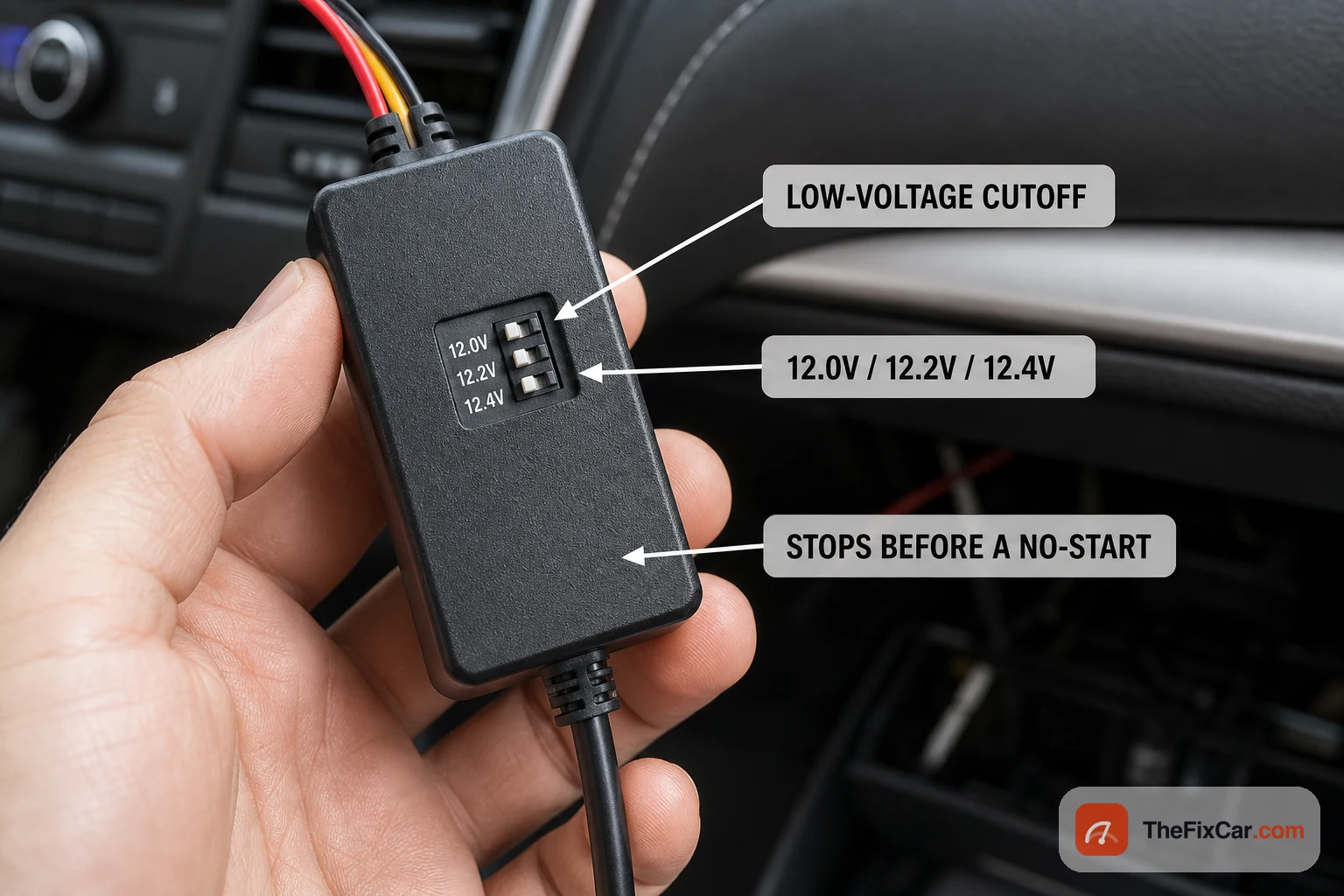
Set the hardwire kit’s low-voltage cutoff first, before anything else: roughly 12.0V for an older gas car, and 12.2V or higher for a newer car, hybrid, or EV, per VIOFO’s install guidance. That setting tells the camera when to stop and helps preserve starting charge, but the safe cutoff depends on battery condition, temperature, and the vehicle’s 12V system. Wiring takes about 30 to 60 minutes, the parts are cheap, but the main risks are battery drain, tapping the wrong fuse, creating a short, or routing the cable across an airbag path.
| Vehicle | Suggested cutoff | What it protects |
|---|---|---|
| Older gas car, large battery | 12.0V | Longest recording time, thinnest starting margin |
| Newer gas car | 12.2V | Balanced: good recording, safe restart |
| Hybrid or EV (small 12V battery) | 12.4V | Shortest recording time, biggest safety margin |
| Car parked 3+ days at a time | 12.4V | Stops the cam early so the battery is not deep-drained |
Cutoff choices above are common starting points from hardwire-kit makers, not fixed rules. Colder weather and an older battery both shrink the margin, so nudge the cutoff up if you park in winter or the battery is a few years old.
Why it matters
Normal parasitic draw, the current a parked car uses for its computers, alarm, and clock, runs about 20 to 50 milliamps, and a healthy battery tolerates that for weeks, according to UTI’s parasitic-draw testing guide. A dash cam in parking mode draws far more: commonly 0.3 to 0.5 amps (300 to 500 milliamps) for a single channel, and more for a dual-channel or high-resolution setup.
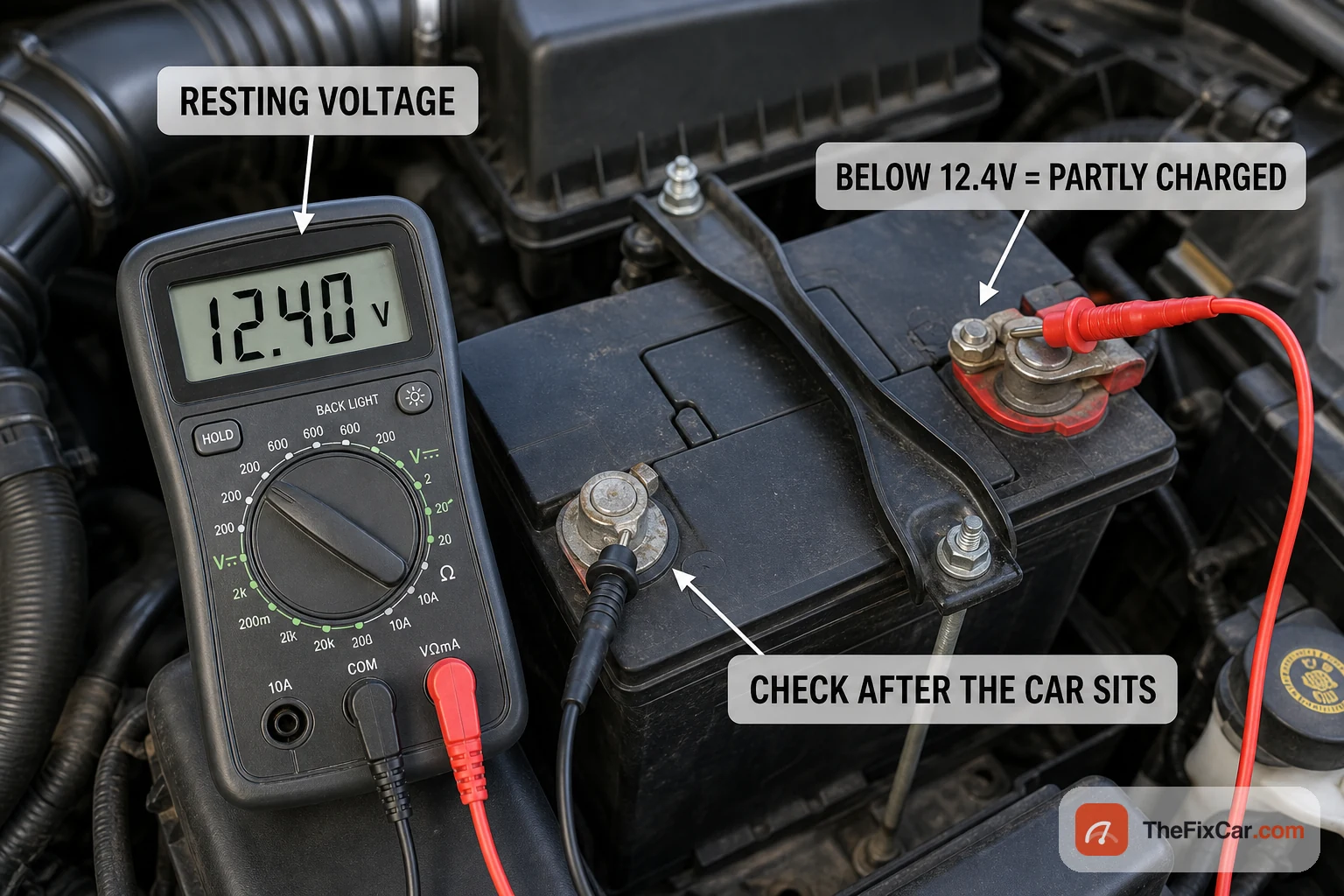
That is several times a normal parked draw, running for hours. In many vehicles an always-on camera can pull voltage down to unsafe starting levels within 12 to 48 hours, and high-resolution or dual-channel recording speeds that up. Treat 12 to 48 hours as a rough warning range: a small or aging battery, cold weather, dual-channel recording, Wi-Fi or LTE, and buffered parking mode can shorten it, while a large healthy battery and motion-only mode can lengthen it. Below about 12.4V, a lead-acid battery is only partly charged; leaving it low or repeatedly deep-discharging it accelerates sulfation and capacity loss. Optima’s technical blog notes that anything above roughly 75 to 100 milliamps of standing draw is already worth investigating, and a dash cam blows past that by design.
Parking that lasts several days changes the math. If the car will sit at an airport, a workplace lot, a storage unit, or the driveway for a long weekend, treat parking mode differently than daily use: raise the cutoff to a safer setting, switch to motion-only recording, add a dedicated dash cam battery pack, or simply unplug the camera before you leave. A setup that is fine overnight can still flatten a weak 12V battery over four days.
Signs the cam is draining your battery
- Slow crank after the car sits. The engine turns over lazily after a day or two parked, then cranks normally once you have been driving. That pattern points at overnight drain, not a failing starter.
- Dead battery only when parked for days. The car starts fine on your daily commute but goes flat over a weekend or a work trip. A parking-mode cam is a prime suspect.
- The cam is warm and still recording hours after you park. If parking mode never seems to stop, the cutoff is set too low or is not enabled.
- Battery warning light or weak electronics on start. Dim dash lights or a slow power window on the first crank of the day suggest the battery went low overnight.
- A new or recently replaced battery keeps going flat. If a fresh battery still dies while parked, an accessory draw like the cam is more likely than the battery itself.
- You wired the cam to a constant-power fuse and skipped the kit. Tapping a permanently live circuit with no cutoff is the classic setup that drains a battery.
How to hardwire it safely
The goal is simple: power from the fuse box, a switched circuit for normal use, and a low-voltage cutoff so the camera never drains the battery below a safe restart point.
- Buy a hardwire kit that matches your camera and includes a selectable low-voltage cutoff. The kit is what protects the battery, so this is not the part to skip.
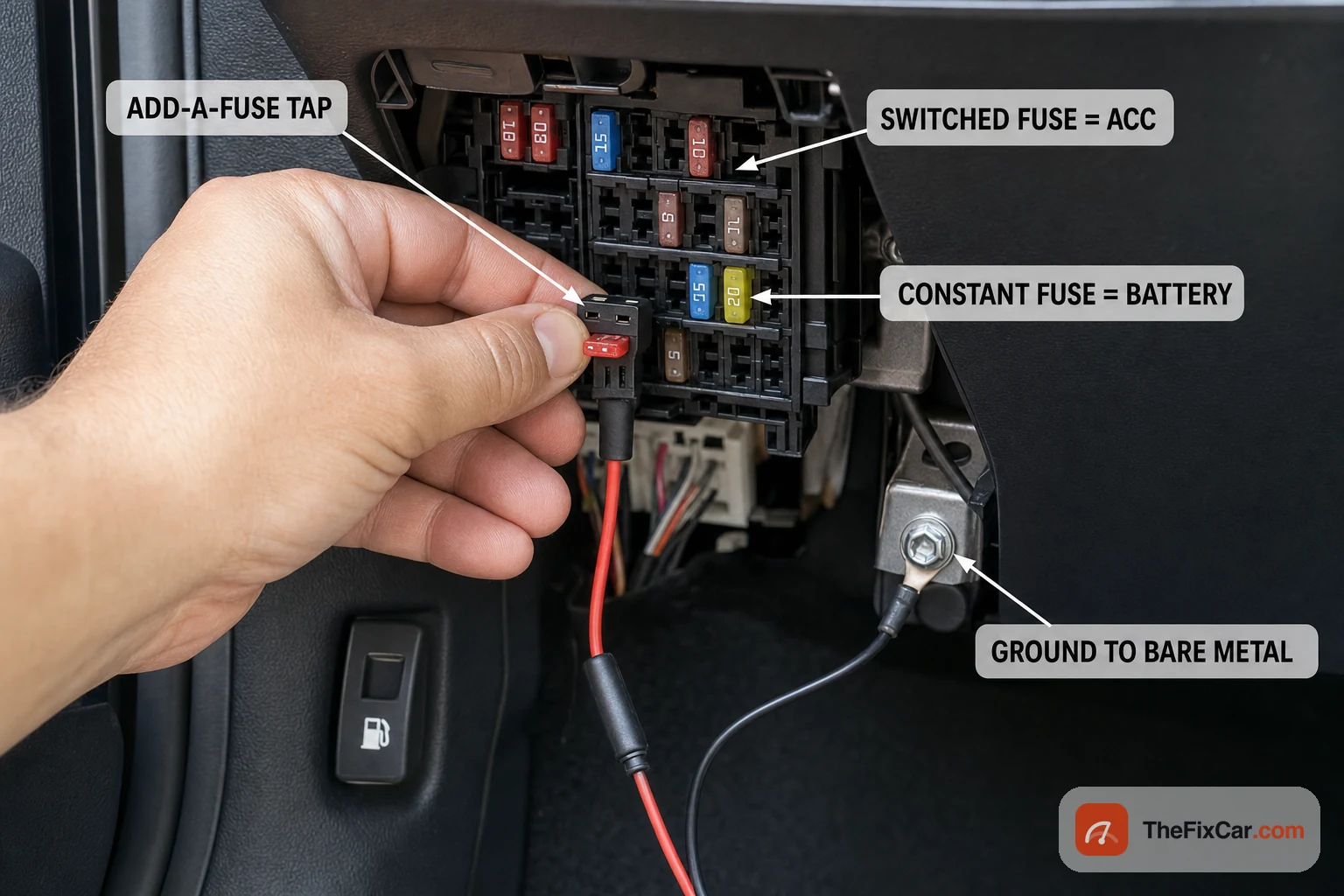
- Find the fuse box and the fuse map. Check the owner’s manual or the diagram on the fuse-box lid to see which fuses are switched (dead when the key is off) and which are constant (always live).
- Choose your fuses. Wire the camera’s constant (battery) lead to an always-on fuse for parking mode, and the accessory (ACC) lead to a switched fuse so the cam knows when the engine is off. Wiring both to a constant fuse is what keeps a camera recording forever and flattens the battery.
- Use an add-a-fuse tap. This tap slots into the fuse socket and gives you a new powered terminal without cutting factory wiring. Match the tap to the mini, micro, or standard fuse your car uses.
- Find a clean ground. Bolt the ground wire to bare metal on the chassis, not to plastic or a painted panel. A poor ground causes flaky parking-mode behavior.
- Set the low-voltage cutoff before you button everything up. Pick the value from the table above for your vehicle. On many kits this is a small switch or a menu setting.
- Tuck and secure the wire. Route the cable up the A-pillar and along the headliner so it stays out of the airbag path and out of sight. Do not run the cable across the curtain-airbag module or zip-tie it to airbag hardware; use the service-manual route or have a shop do the install if the path is unclear.
- Test parking mode. Turn the car off, confirm the cam switches to parking mode, and after a day parked, check that it shut down at your cutoff rather than draining the battery. A multimeter across the battery tells you the resting voltage.
Before you hardwire
- Do not wire both leads to a constant-power fuse. With no switched signal and no cutoff, the camera records around the clock and drains the battery.
- Do not rely on the cigarette-lighter socket for parking mode. On many cars it stays live with the key off, so a plug-in cam keeps drawing with no protection at all.
- Do not set the cutoff below your battery’s comfort zone. A very low cutoff buys more recording time but leaves less charge to start the engine, especially in the cold.
- Do not tap airbag, ABS, or ECU fuses. Pick a low-stakes circuit instead, and never leave the add-a-fuse hanging loose against the airbag deployment area.
- Do not assume a weak battery will cope. A battery more than about three years old, or one already sitting low, has little margin for any standing draw.
DIY or shop
- DIY difficulty: Easy to Moderate. The wiring is basic, but finding the right fuses and a clean ground, plus tucking the cable neatly, takes patience on a first install.
- DIY cost: a hardwire kit with cutoff runs roughly $15 to $40, plus an add-a-fuse set and a cheap multimeter if you do not own one.
- Shop cost: professional hardwiring commonly runs about $50 to $150 depending on the shop, the car, and whether it is a single or dual-channel install.
Cost ranges here are rough U.S. figures. Your vehicle, the kit, and local labor rates all move the price.
FAQ
Will a hardwired dash cam drain my battery? It can, if there is no low-voltage cutoff or the cutoff is set too low. With a proper kit set to a sensible voltage, the camera shuts off before the battery reaches a no-start level.
How long can a dash cam run in parking mode before killing the battery? It varies with the camera and the battery, but an always-on cam can lower voltage to unsafe starting levels within roughly 12 to 48 hours in many vehicles. Motion-only or buffered parking modes stretch that out.
What voltage should I set the cutoff to? Around 12.0V for an older gas car with a big battery, 12.2V for a typical newer car, and 12.4V for a hybrid, EV, or any car you park for several days at a time.
Is it better to hardwire or use a separate battery pack? A dedicated dash cam battery pack recharges while you drive and never touches the starter battery, so it is the safest option for long parking sessions. Hardwiring is cheaper and simpler and is fine with a working cutoff.
Can I run parking mode from the cigarette lighter or 12V socket? Usually not safely. On many cars the socket stays live with the key off, so a plug-in camera keeps drawing with no low-voltage cutoff and can flatten the battery. For parking mode, hardwire through a kit with a cutoff or use a separate dash cam battery pack.
Can hardwiring a dash cam drain the battery on an EV or hybrid? Yes. Many hybrids and EVs have small 12V batteries or manufacturer-specific 12V charging behavior, so a parking-mode camera can create a no-start or warning condition if the cutoff is too low. Use a higher cutoff (around 12.4V) and check your owner’s manual before tapping any fuse.
My battery keeps dying since I installed a dash cam. What now? First, disable or unplug the dash cam for one night after fully charging the battery, then compare morning resting voltage with and without the cam connected. If the voltage drop disappears, raise the cutoff or fix the wiring; if it still drops, test the battery and have the vehicle’s parasitic draw measured.